• Skip to primary navigation
  • Skip to main content
  • Skip to primary sidebar

Manten Resources

Supporting your Japanese language program

  • Manten Resources
  • About
  • Teachers
    • Stage 6 Beginners
    • Jblog Textbooks
      • Jblog 1
      • Jblog 2
      • Jblog 3
      • Programming
    • Base Camp
    • Student Workbooks
    • Amazing Races
    • Assessment
      • Manten Exams
      • Assessment Inspiration
      • Script Resources
    • Blog Spot
  • Parents
  • Contact

Manten Resources

Online learning options

March 30, 2020 by Manten Resources

During this new period of self-isolation and restricted movement, I have discovered a new level of mindfulness in my daily life. Even road signs begin to take on new meaning when so many of our daily distractions, both good and bad, have been removed. This week’s roadside prophecy was “Use other path”. This is the reality for many teachers now coming to terms with online learning.

Today I want to focus on what a lesson might look like in two common platforms – Canvas and Google classroom. The key point to remember is that you do not need to be perfect. Have a growth mindset and allow yourself the space to improve gradually. In this post I will show you how to use your Jblog google forms as they are in a google platform and how to adapt them to the Canvas platform. If you click on the images contained in this post you will be able to see them more clearly.

The Google platform

If you are using Google classroom it is relatively straightforward to add your google form task to your classwork stream.

You can create an assignment and just add the link to the google form. You can then add instructions and a title, and you are done.

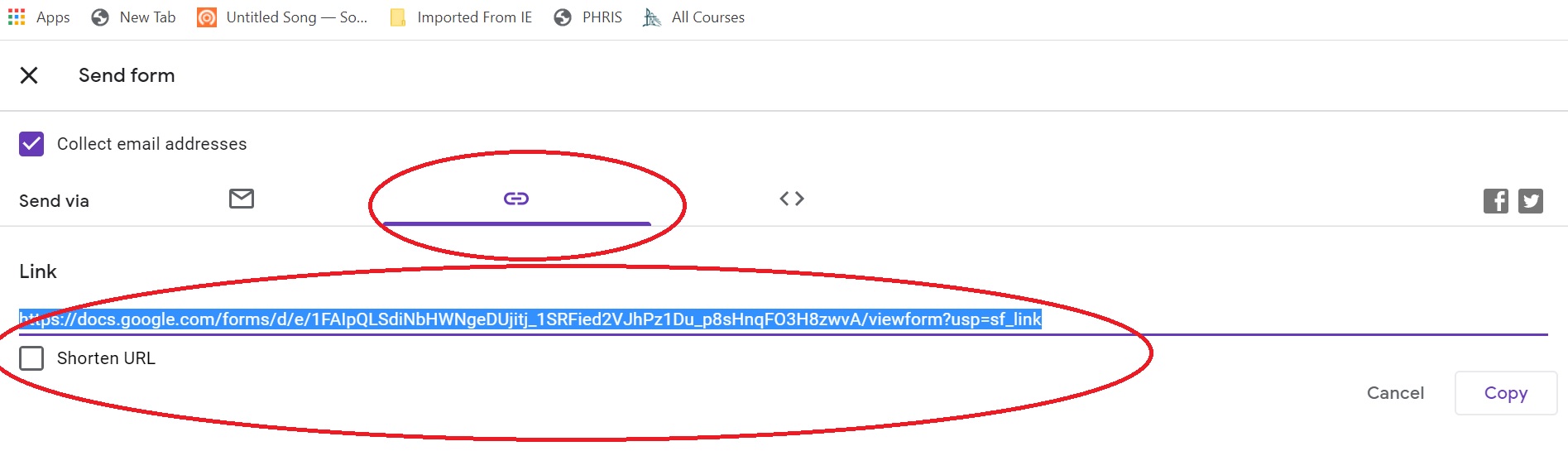
You can get the link to the google form by going to your copy of the form on google drive. Click on the send button and then select the link tab. This will provide you with the link you need.
The Canvas platform

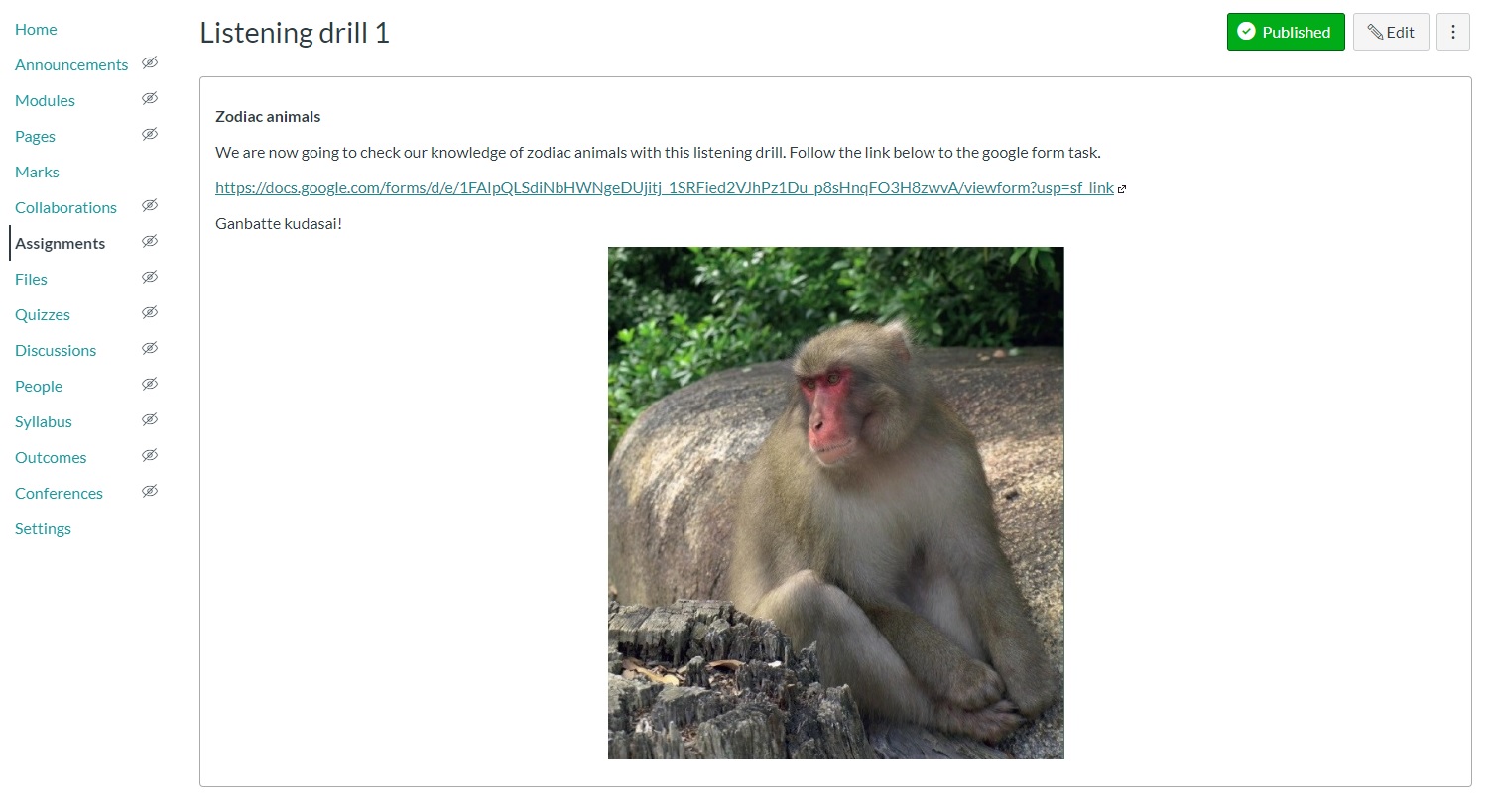
You can achieve the same thing in Canvas by adding the link to the google form and directing students out of Canvas to complete the form. (See above regarding how to get the link to your google form.) I added this to my module as an assignment page. If you want to keep the marks all in Canvas, you can manually add the score to Canvas if you add the points to the Canvas assignment set up.
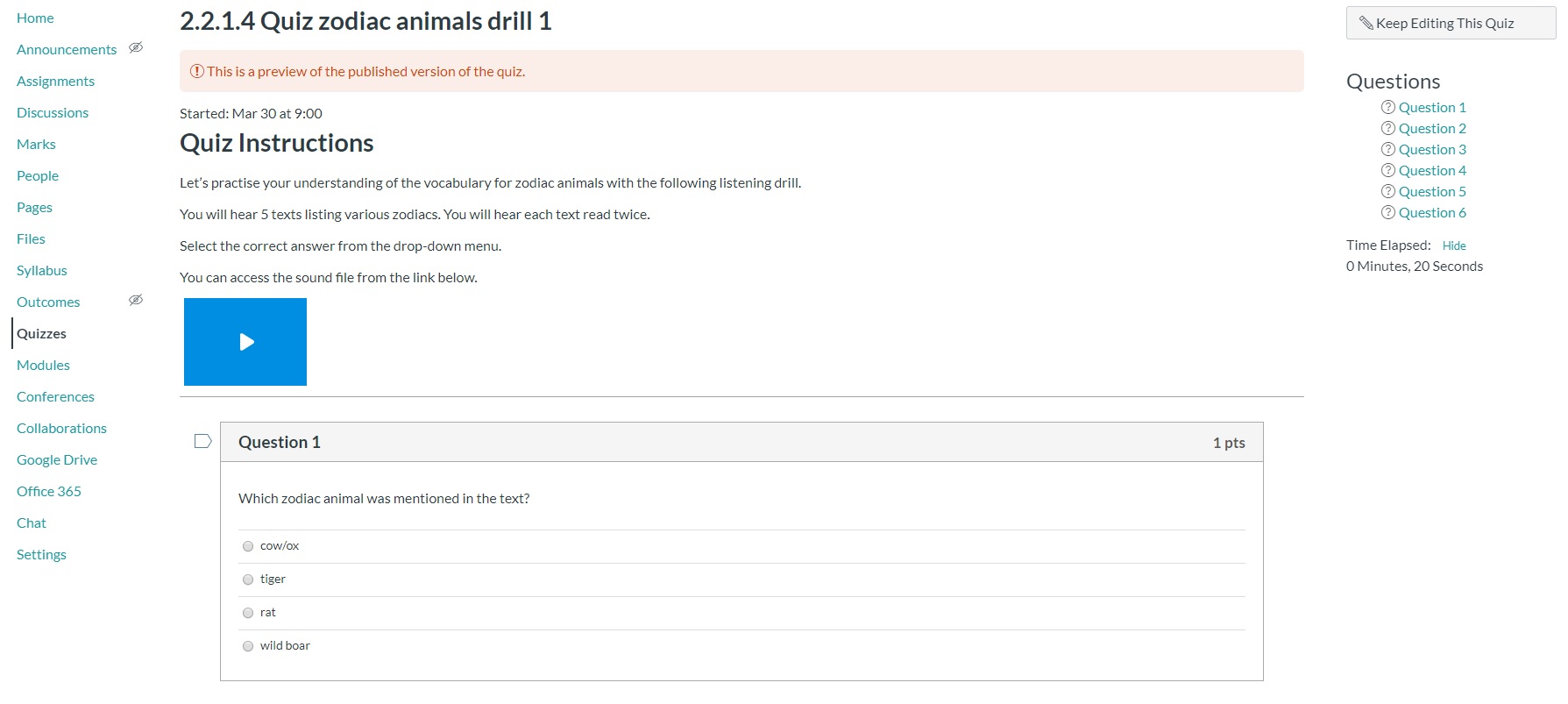
When you have more time, you may want to start moving the content into Canvas as a Canvas quiz and keep everything within the one program. You can do this by setting up a normal Canvas quiz page and adding the sound file for the quiz from your Jblog google folder.
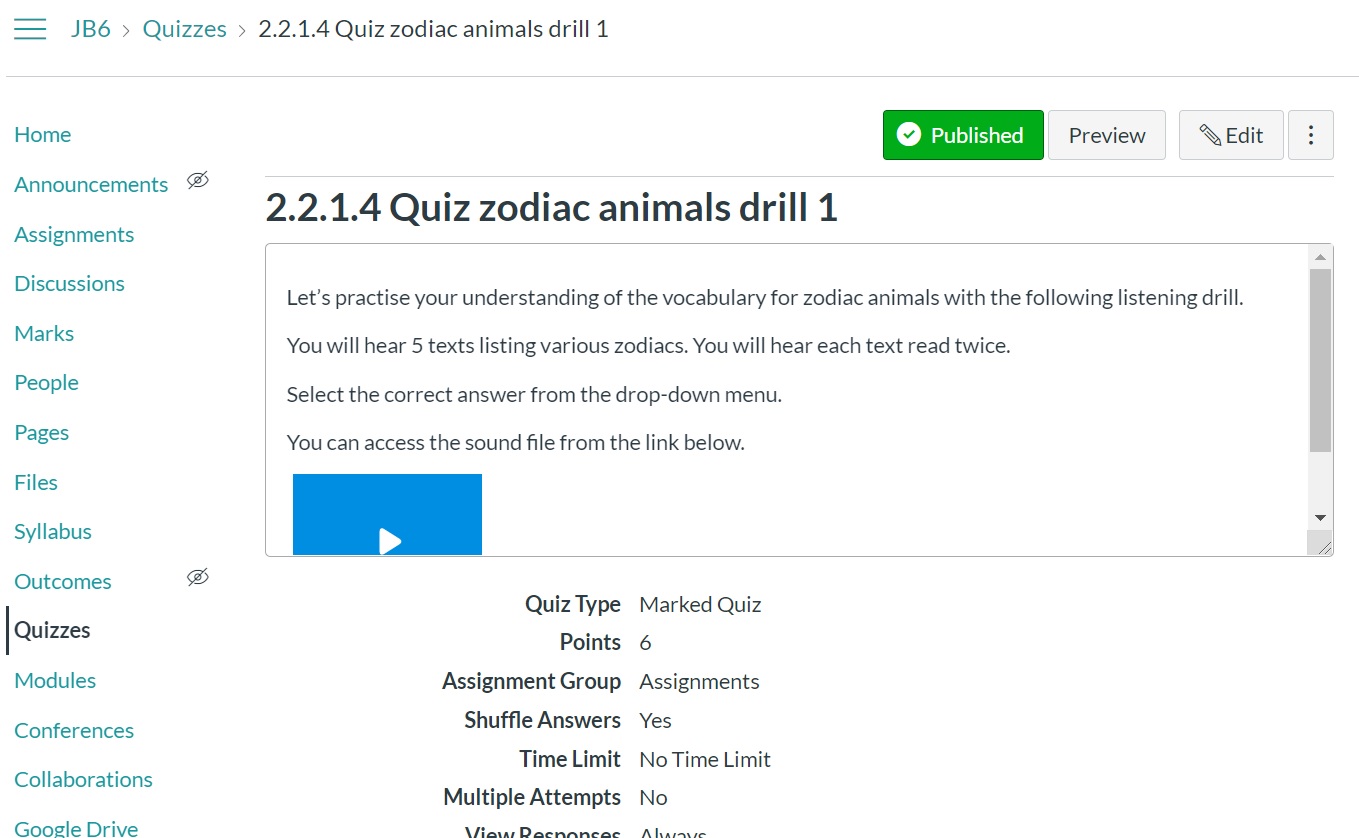
You can find the sound files in your google folder in the Sound files folder for the relevant chapter. Upload that sound file to Canvas by selecting the record/upload media button, then select the Upload media tab and Select audio file tab. I find this works better than inserting a link to a file as that tends to require a download and is less seamless.
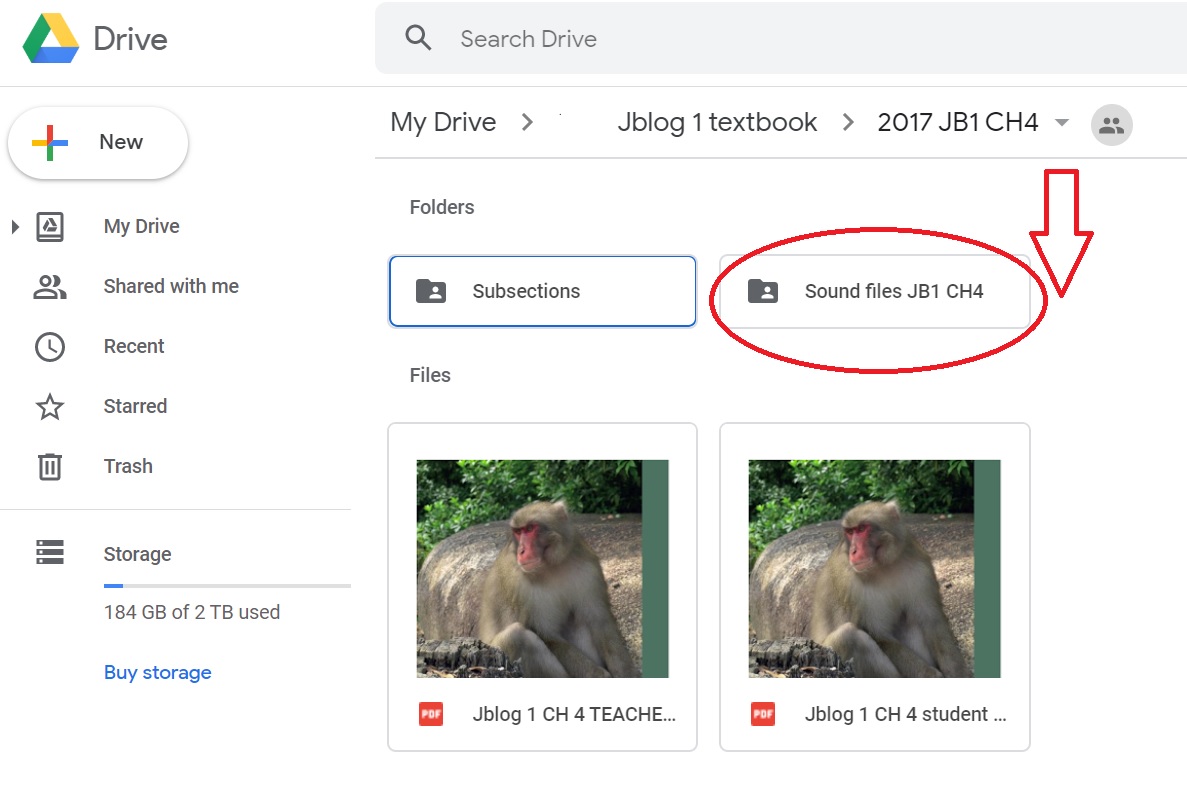
You can then copy and paste the questions and answers into your new Canvas quiz from your old google quiz.
Good luck everybody. If you have questions or you get stuck, please feel free to contact me at  jblog1help@gmail.com .

We are all learning together and if I can help if some way, please let me.

Stay well.
Filed Under: Growth mindset, ICT, Teacher Wellbeing, Teaching and Learning, Uncategorized

New ways with old resources

March 23, 2020 by Manten Resources

Tomorrow my son’s school will close and we will be a family of 3 working from home. As many of us face similar prospects, it is a good time to reimagine some of our old resources in the new online context.

I am a tactile teacher and love hard copies, particularly for tasks where I want the students to write. I am a parent too though and realise that even if I upload worksheets online, the expense of printing at home will not be feasible in the long run for most families. This has led me to look at options for how to use my old favourite worksheets without printing them out. If you are using Jblog student workbooks, you will realise that most of the tasks are also available as pre-made google forms. You can simply upload these to your school platform such as google classroom. Some tasks do not fit that format though so let’s look at how we might tackle these activities.

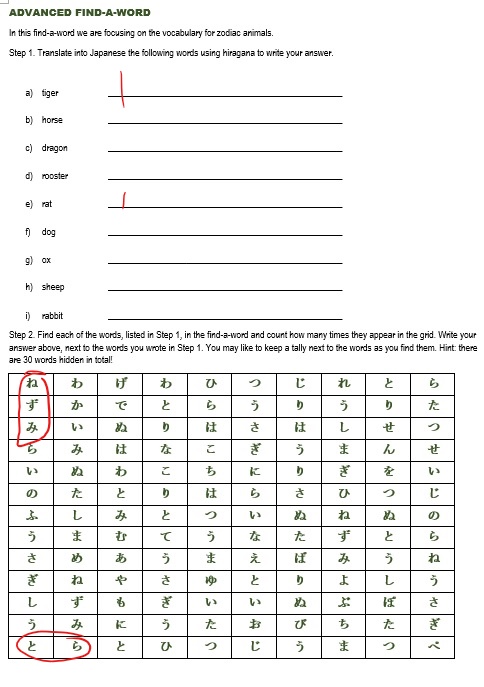
We are going to use this example of a find-a-word that the teacher has made as a word document.

Option 1. Make the worksheet a jpeg image.

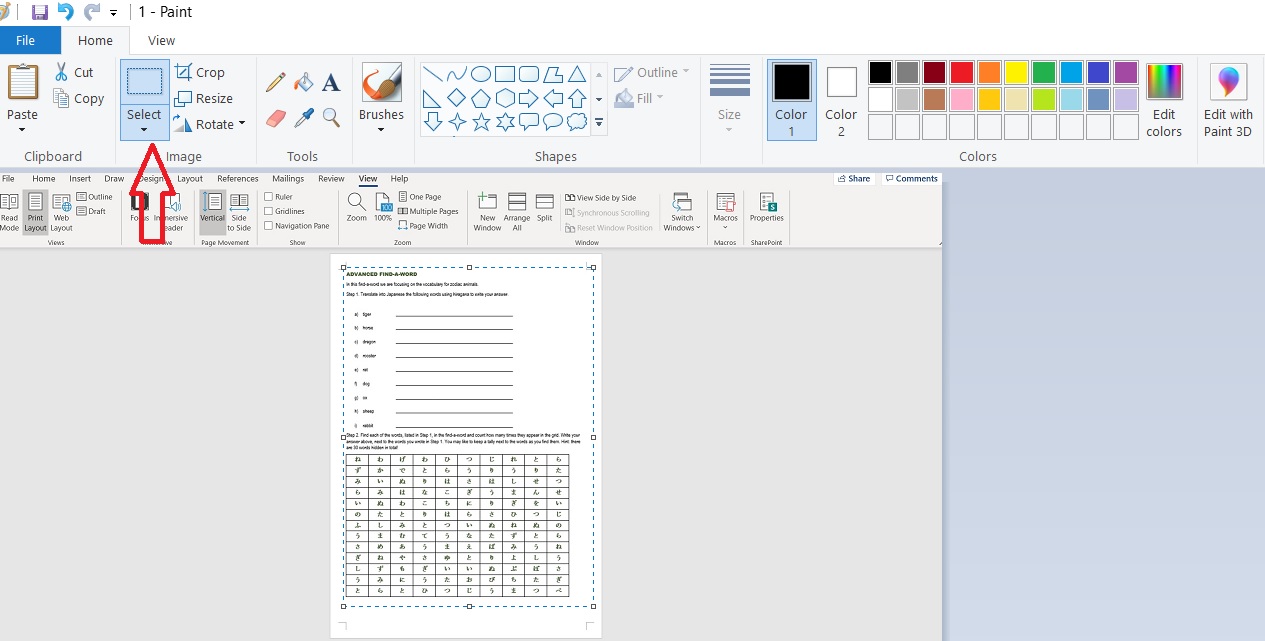
  1. Open the word document and CTRL+prt sc to screenshot the worksheet.
  2. Paste into paint program. Zoom out so that you can see the full page. Click on the Home tab + select.
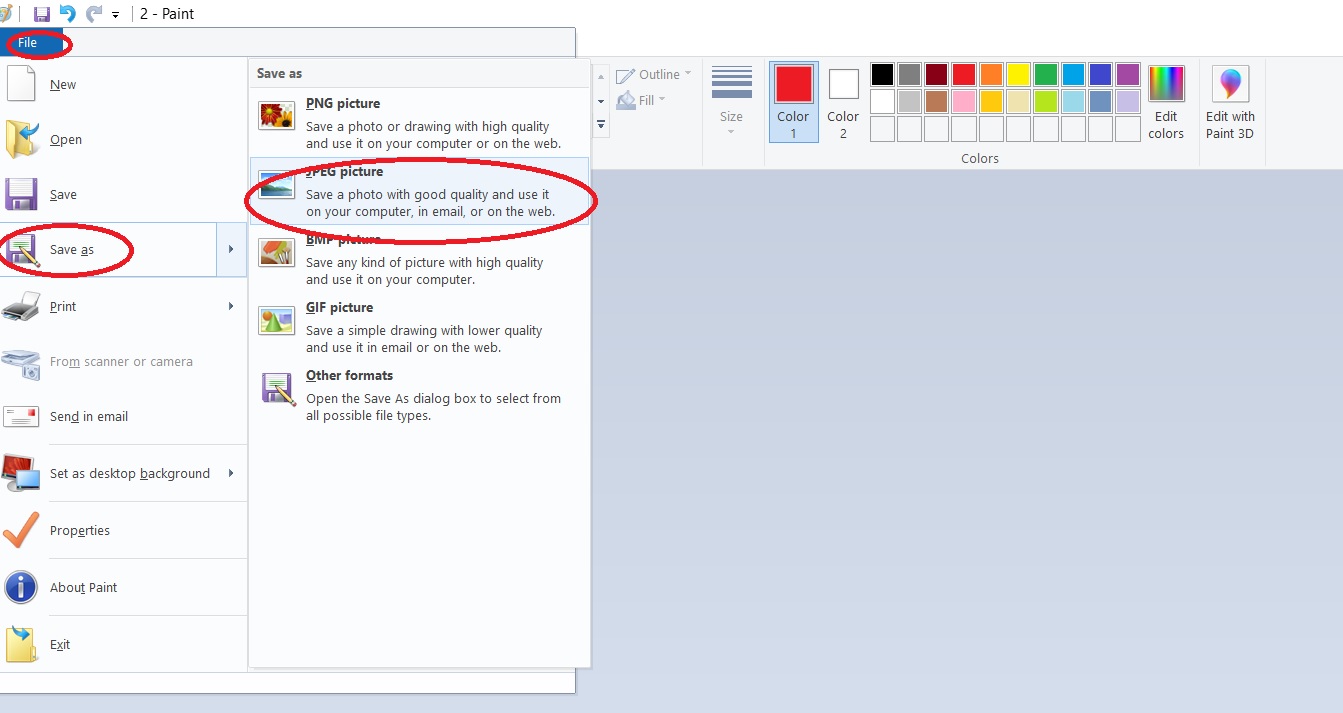
  3. You will be left with just the image of your worksheet. Click on file + save as + jpeg and name the image.
  4. You can now upload the jpeg to your online platform. The students can then open up their copy and complete it using their digital pen. They can save the completed image and share with you as evidence of their work.

Option 2. Make the worksheet a google drawing

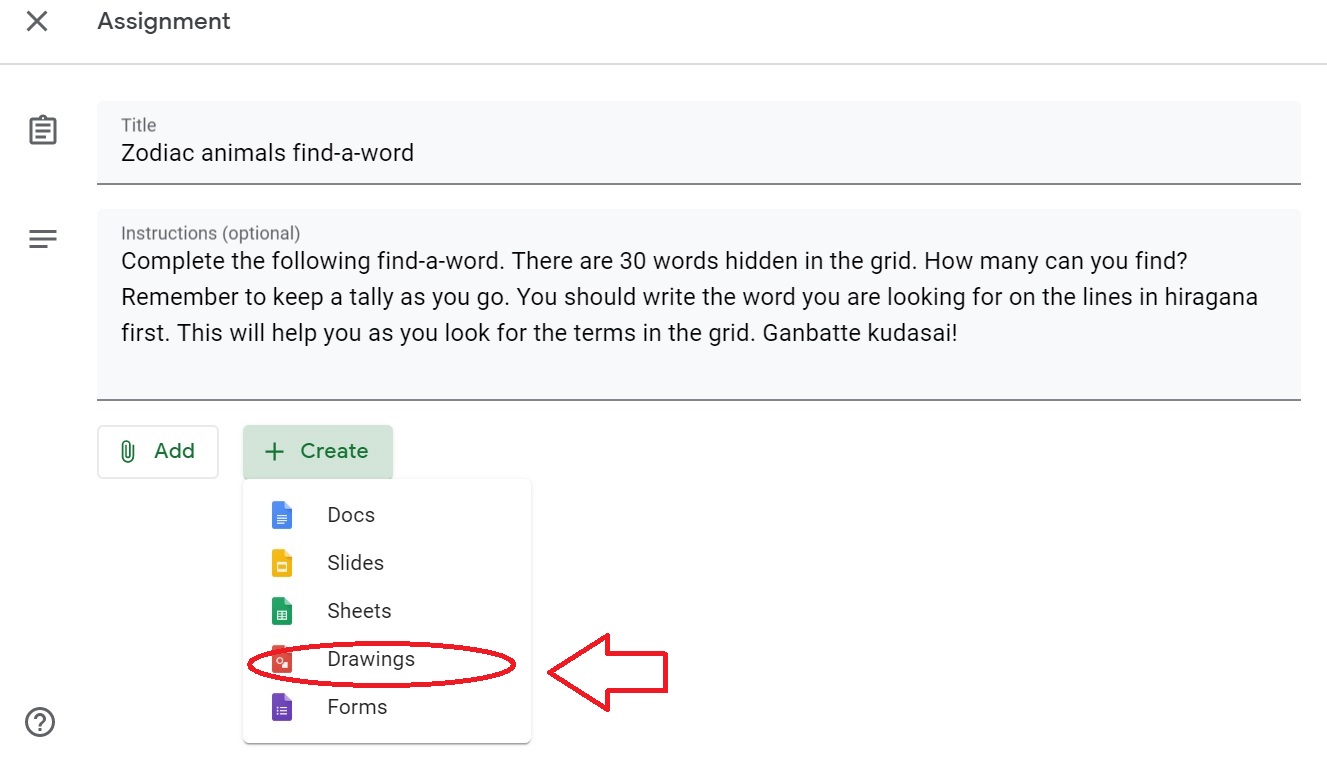
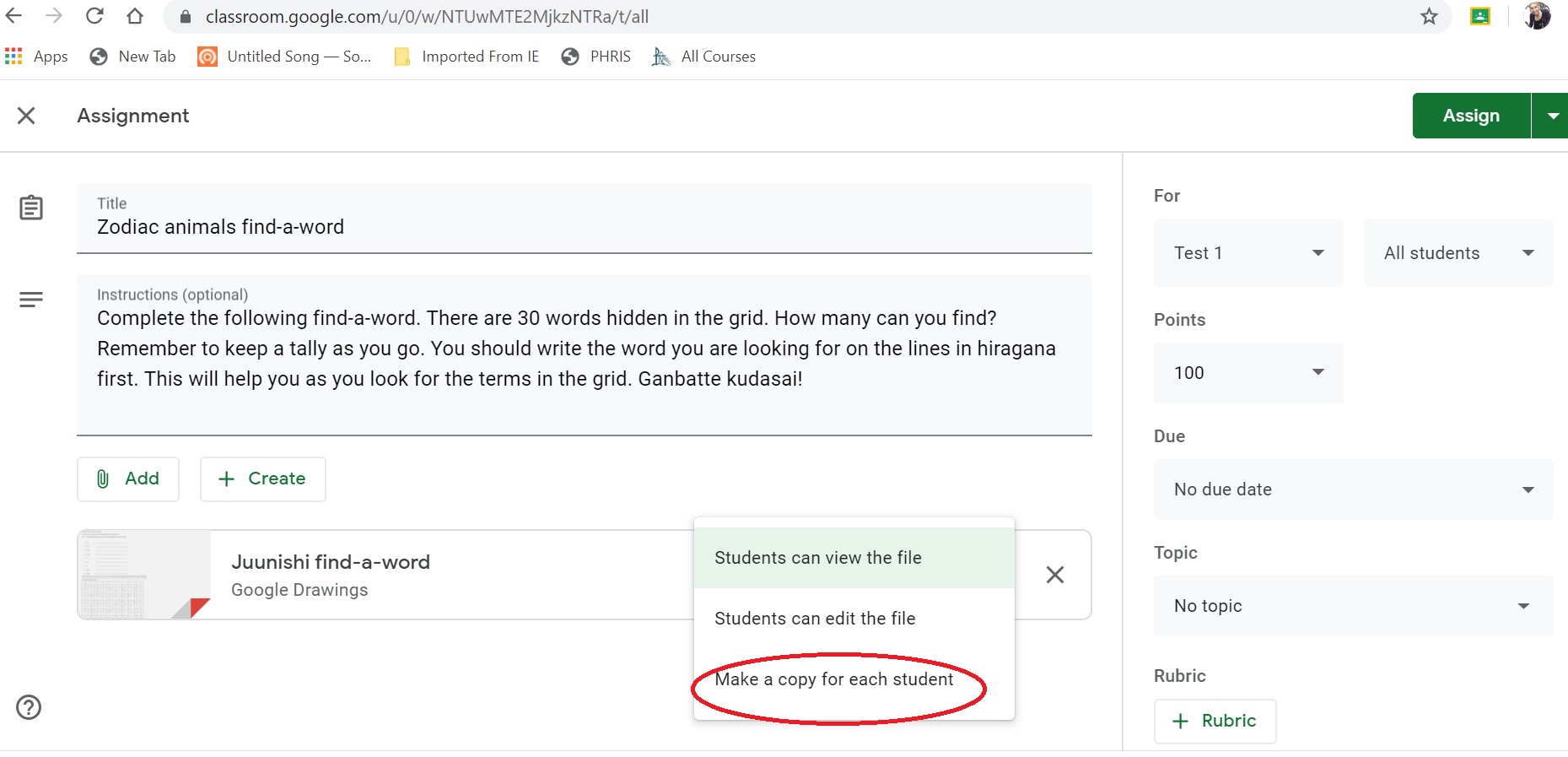
  1. In your google classroom, make a new assignment. Type in the instructions for the task.
  2. Click on the create button to access the drop-down menu. Select google drawings.
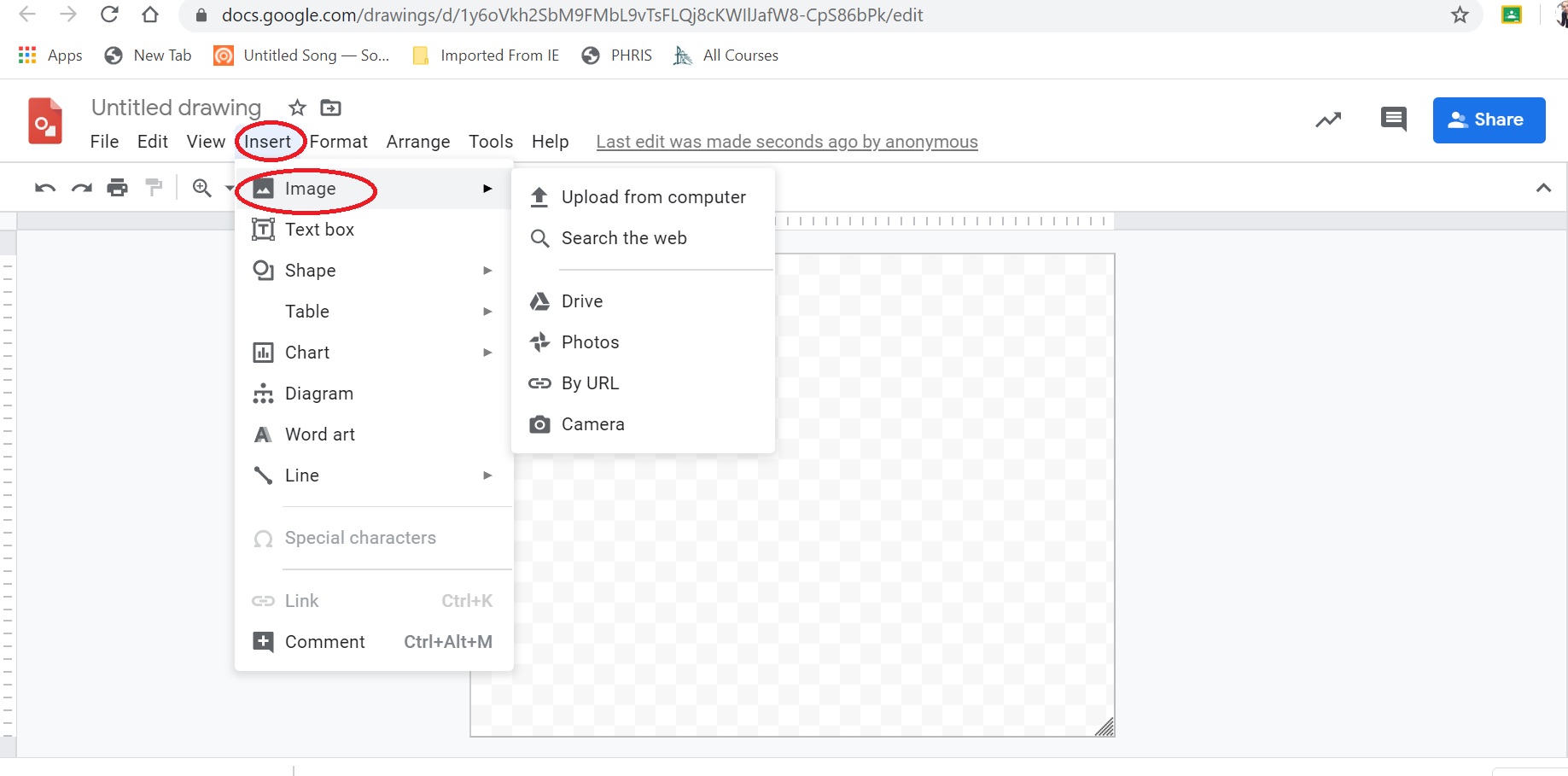
  3. Paste your jpeg image into the google drawing page. Select make a copy for each student.
  4. Click on assign (if you are ready for them to see the task). Students can then answer on their copy which is saved automatically.


This example was for a simple worksheet but you could use it with longer tasks such as teaching hiragana via the Hiragana Patch system.

There are lots of great interactive tasks online for us to use but don’t forget to include some calming tasks such as this find-a-word in your programming of activities.

Remember my favourite quote “The worst use of time is to do something really well that needn’t be done at all”. (Brian Tracy, Eat that frog!) If you have a worksheet that works, keep on using it. You just need to update how your student accesses it.

Good luck everyone.

Filed Under: ICT, Teacher Wellbeing, Teaching and Learning, Uncategorized

Teaching under COVID-19: our time for Kensho

March 17, 2020 by Manten Resources

This year has been a challenging one. We’ve had terrible bushfires, followed by storm damage and now a pandemic – and we’re still in term 1! Times like these can be stressful for both students and teachers. I am hopeful though, that this slow-down of our lives will help us experience a moment of kensho. Kensho is defined by Vishen Lakhiani as “Growth from temporary pain”. It can shock us into hansei, (reflection), with regards to how lucky we have been to have had so much choice in the past; but also a mental edit that perhaps some of the things we were cramming into our lives in the past are not missed now that they are gone.

This week I was saddened when our conferences and workshops had to be cancelled or postponed until next year. I was due to run a primary network meeting tomorrow but due to the enthusiasm of the group we have decided to run it virtually. This event is forcing me to upskill my knowledge of videoconferencing – a task that had been on my to-do list for months. I need to be an expert by tomorrow – and will subsequently need to adopt a growth mindset when I realize I am not.

Many of us are preparing to live and teach with less face to face contact. Teaching, as we know, is heavily influenced by the relationship that exists between the teacher and the students, and between the students themselves. As we prepare to run courses on-line, we need to ensure that we strive to maintain that connection. Here are some tips to do so.

  1. Use a narrative or the first person when creating resources. The students need you now more than ever so where possible share voiceovers or videos of yourself welcoming the students to the work each week and verbally talking them through the tasks you lined up for them.
  2. Consider including a task like The Platform. This formative task encourages students from year 9 to 12, to share their interests and use language to comment on each other’s findings. Working in smaller pods of students enable them to feel less social anxiety about sharing and can develop a sense of connection with the teacher in a virtual space.
  3. Manage your own mental health by using resources and websites that are ready made for some tasks. Your energy is better spent on providing feedback to the student on their efforts than in spending hours creating the perfect on-line task.

We know that some of us who use class sets of textbooks may be worried about what to do when the teaching goes on-line. To help with this, we have made flipbooks of Jblog 1 and Jblog 2 textbooks that are available to teachers for a one-off fee of $100 during this COVID-19 period. This cost allows use to load the text to your school’s preferred online platform to enable access for your students. This offer is only available to school’s who have purchased a class set in the past. Email me at jblog1help@gmail.com for details.

Good luck everyone during this time of change and challenge. Keep looking for those moments of kensho!

Filed Under: Student Engagement, Teacher Wellbeing, Teaching and Learning

Feedback and work life balance

February 18, 2020 by Manten Resources

A month into the school term and already those fantasies of a work life balance have fallen by the wayside. I am currently seconded to write an online course as part of a larger project. It is a fabulous opportunity, but I have begun to realize that there is no limit to the amount of time and energy you could pour into the task. This realization has caused me to reflect on where my time is best utilised.

One of my favourite quotes is by Brian Tracy who states: “One of the very worst uses of time is to do something very well that need not be done at all.” I see regular evidence of this in the workplace – meetings about what will occur at the upcoming meeting for example. But equally of concern, is doing something that actually needs to be done, but to a poor standard that questions whether it was actually worth doing at all. An example of this is marking of student work and feedback.

Teachers spend hours of their lives marking assessment tasks and regular classwork. The sheer volume of this aspect of our roles, has sometimes led to an emphasis on completion and fast turn- around times. Telling a student what they did wrong without actually giving them useful suggestions on how to improve next time, is almost pointless for all but the very motivated and self-aware. One step that also tends to be missed is feedback explicitly pointing out what students have done well. Sometimes they are not consciously aware of which aspects of their work are good or why something is working. To this end, I have begun to change the way I present feedback to students.

Many of us now teach using a blended learning model. Face to face lessons are supported by online tasks and resources via platforms such as Google classroom, Collaborate or Canvas. These provide us with an opportunity to improve the quality of our feedback in more time efficient ways. Let us consider two of these opportunities now.

1.Recorded verbal feedback

My son received this for a task from his year 6 teacher and I was so impressed. It allowed the parents to hear the feedback and my son to listen to it multiple times. He could pause it, and follow-up with the teacher if he wasn’t sure on an aspect of it, later in person. He could use it as a resource for later tasks. Most importantly, he could hear the tone of his teacher’s voice and was better able to interpret her message than when it is presented as a written comment. To create a comment, you simply press record. Amazing!

2.Online quiz feedback

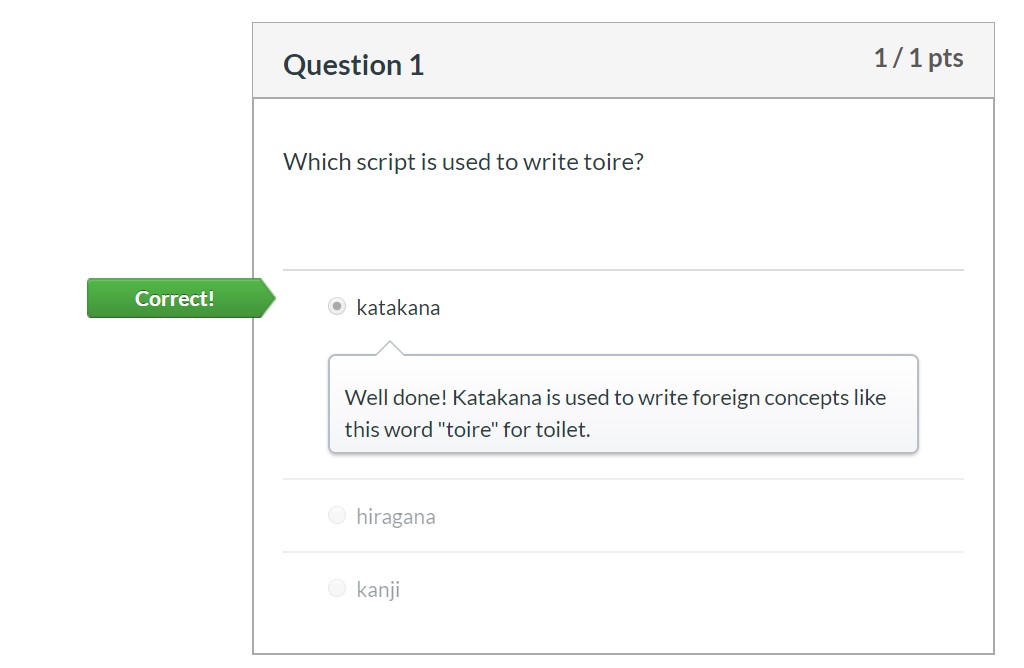
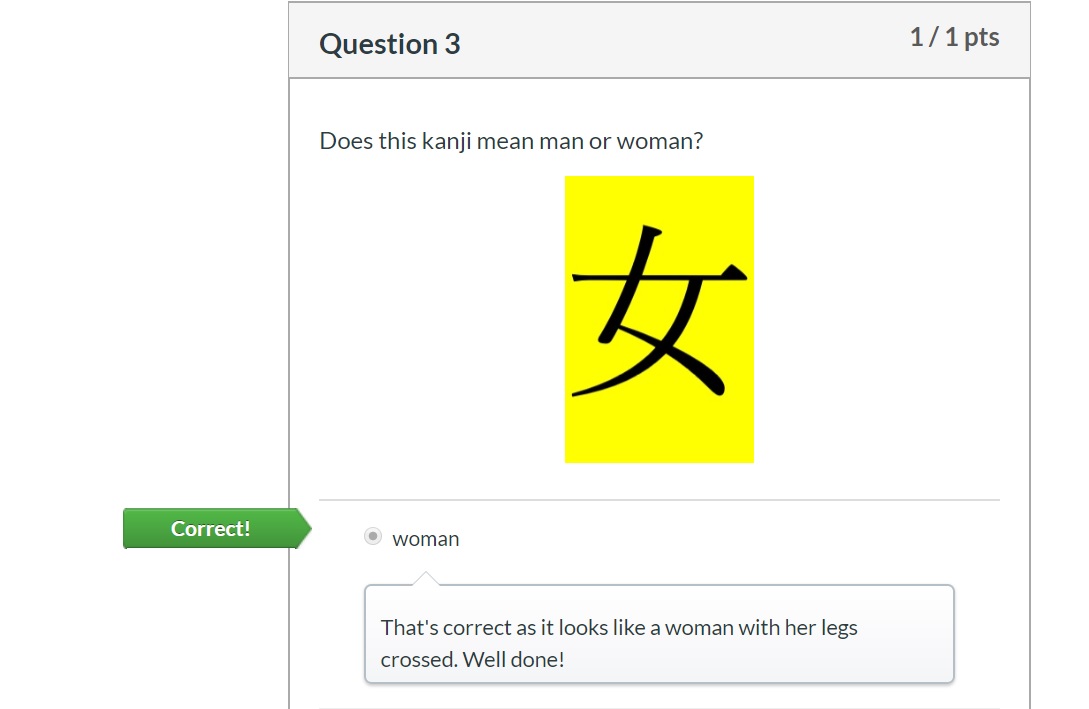
Self-marking online quizzes are a fantastic tool in the contemporary teacher’s armoury. Students can work through the questions at their own pace and the marking is virtually instantaneous. The best platforms allow you to give a comment as well as indicate the correct answer. This is particularly needed for multiple choice questions where the student may have guessed the correct answer. As such, I include a comment even if the student is correct, to ensure they understand why this is the correct choice. Sometimes I will include a brief mnemonic to help them remember it next time.

I have found both of these techniques to be worth the time commitment. I value feedback and recognise the positive impact it can have on my students. I also need to sleep. Aim to analyse the impact of your efforts and make conscious decisions about how you invest your time – for your own sake and your students!

Filed Under: Assessment, Teacher Wellbeing, Teaching and Learning

Enabling student success in languages

January 31, 2020 by Manten Resources

New Year, New cohort. But are your students equipped to learn a language?

As a Language teacher in Australia, I often describe myself as a naive optimist. I almost consider this mindset to be an essential trait of my job. The odds are stacked against us in many ways, yet we continually strive to bring fresh energy and enthusiasm to our lessons each year.

Last year, I realised though, that perhaps we were missing a key step. Although we made huge efforts to teach languages well to our students, perhaps we didn’t always check first if the students were ready for the journey. It’s like taking a group hiking without checking what they have in their backpack. Do they have water and food? Appropriate clothing and shoes? How is their current fitness levels?

Some may argue that they do a quick survey at the start of the year to check if the students have had experience with language learning. This is a good first move but it doesn’t provide us with much real data on how equipped our students are to learn a language with us, now, as high school students.

I have come to the conclusion, that explicit teaching of skills to access learning in language is the essential first step in the language journey. To this end, I have developed two short introductory courses for secondary students called Base Camp level 1 and level 2. 

The first course is pitched at Year 7/8 students who may be beginning a language course for the first time. It covers five key concepts to develop student skills in learning and motivation. These include concepts such as implementation intentions, habit stacking and the two-minute rule.

The second course is pitched at Year 9/10 and 11/12 students who may have continued into elective courses. This sequence looks more closely at specific learning strategies to support independent learners. It suggests ways to revise and extend one’s knowledge in the macro skills using accessible resources from the students’ world. This includes various strategies to harness teenager obsession with social media for positive learning gains in language.

Both of these resources outline how to harness research into the psychology of motivation to help students find time and motivation for their language learning and provide an infrastructure for successful learning to occur.

Although there are two levels, I would suggest that students, who have not worked with the level 1 materials, would benefit from working through those, before attempting the level 2 materials. The Base Camp level 1 and 2 resource is sold as a set for $50 and can be purchased by emailing jblog1help@gmail.com .

If you are interested in learning more about this topic, you may be interested in attending our Noosa Workshop in July. Details and booking information is available via this link.

Good luck with your new classes in 2020!

Filed Under: Differentiation, Student Engagement, Teaching and Learning

What’s new in 2020?

January 22, 2020 by Manten Resources

Welcome to the new year! Here’s a quick update of what’s happening in 2020 and a game to get you started with those new classes.

1.The new Jblog 4 Express launch

This textbook is designed specifically for the Stage 6 Beginners Japanese course mainly taught in NSW. It will share a similar feel to the other Jblog textbooks but will include new features like a city focus and destination text in each chapter.

2.Stage 6 Beginners Japanese Kanji Patch

A Kanji Patch specifically for the Stage 6 course is on its way. Students can move smoothly through the Hiragana, Katakana and now, Kanji Patches.

3.Digital versions of Jblog textbook 1 and 2

Digital versions of Jblog 1 and 2 are now available in the form of flipbooks. Whilst we still believe the research that shows hard copy textbooks are both preferred by students and have greater learning gains, we understand that it can be useful to have a hard copy at school and a digital copy at home for homework. That option is now available.

4.Noosa Workshop 2020

Our Noosa Workshop for teachers from all states and levels is running again Saturday, July 11th  2020. You can read more about it and book a spot using this link. We may take a break in 2021 due to family commitments so don’t miss this year’s workshop.

Keep an eye on our facebook page for the exact dates each of these and other new resources go live.

Don’t forget that we launched several new resources at the end of last year including Base Camp, The Platform and The Year 7/8 Investment Expo Assessment task. These may also help kick start your new academic year in a fresh way.

Open-ended review game

When you start the year, often you are taking on a class of students that you didn’t teach in the previous year. This game is a great way to ascertain what they remember after the long summer break. It doesn’t need any IT or internet either!

This is a version of the hearts and crosses game.

Step 1: Board preparation

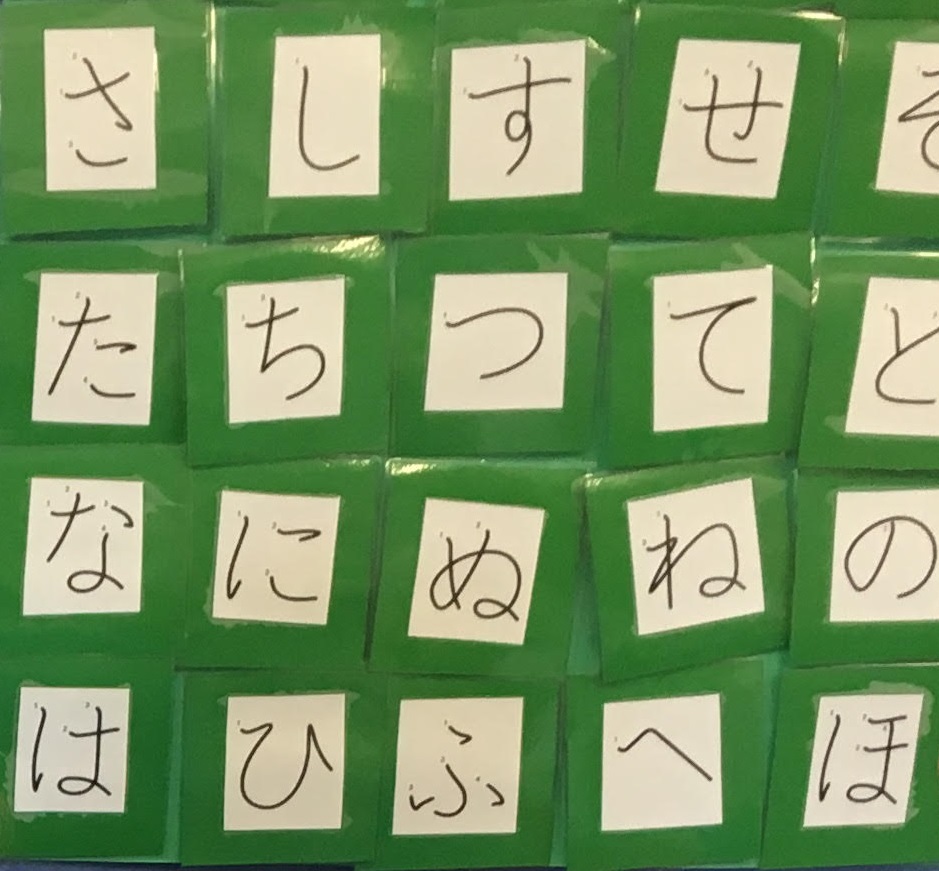
You need a piece of cardboard that you rule up into a table with 5 columns. These columns will house hiragana cards going left to right eg ka, ki, ku, ke ko. I make cards to fit these columns that are about 10cm by 10cm. Write a hiragana on each one and laminate if you like. I then use Velcro dots to stick the hiragana cards to the table. This means you can easily take the cards off to reveal what is behind each card during the game. It also makes packing up quick at the end.

On your cardboard table you can now write in pencil random points. I usually use a mixture of 5, 10, 20 and 50 points. I also hide one or two 100 points and 5 hearts and 5 crosses. I write these in pencil so that I can change the location in the future. Your students will quickly rote learn the location of the higher points otherwise!

Step 2: Question generating

Put students into table teams and name them after a colour in Japanese eg aka, midori. It doesn’t matter if you haven’t studied colours yet. They only need to remember it as their team name.

Give them scrap paper and 5-10 minutes in teams to write down as many questions with a sample answer as they can about anything they remember studying about last year in Japanese. It can include vocabulary, grammar, or cultural knowledge. They must write their team colour on every strip of paper. This is very important. Gather all the team questions, mix together then place in a bag.

Step 3: Playing the game

On the board draw a basic table with each team colour listed in a column. Give each team 20 points to start. You then ask the first team to pick a hiragana letter from the board. You then randomly pick out a question from the bag. Read out the question. That team will attempt to answer and if they get it correct, remove the hiragana card from the board to reveal their points eg 5, 10, 100 points. Add those points to the score chart on the board. If they get a heart though, it doubles their current score. If they get a cross, it halves their current score. If they get the question wrong, nothing happens. Do not reveal what is behind the hiragana card if they get it wrong.

When reading out the question, check which team wrote it and give them 5 bonus marks. This means that the team who writes lots of questions has an advantage so make sure you explain this to the students before they start writing questions. This really motivates them. You can also reject a question if you don’t like it. If the students who wrote the question have a good question, but a wrong sample answer you can still use it and give them points. This helps you understand their misconceptions. Just explain the correct answer to the class when you award the points.

The beauty of this game is you can make it as long or short as you need to and don’t need to prepare any questions in advance. The board can be re-used and you can change the hiragana cards for katakana cards for older students. If your students don’t know hiragana, I used it in primary by giving them access to a hiragana chart and they were fine.

As always, if you have any questions, please feel free to email me directly at jblog1help@gmail.com .

All the best for a fabulous 2020!

Filed Under: Professional development, Student Engagement, Teaching and Learning

  • « Go to Previous Page
  • Page 1
  • Page 2
  • Page 3
  • Page 4
  • Page 5
  • Page 6
  • Interim pages omitted …
  • Page 11
  • Go to Next Page »

Primary Sidebar

Copyright © 2026 · Manten Resources - All Rights Reserved