• Skip to primary navigation
  • Skip to main content
  • Skip to primary sidebar

Manten Resources

Supporting your Japanese language program

  • Manten Resources
  • About
  • Teachers
    • Stage 6 Beginners
    • Jblog Textbooks
      • Jblog 1
      • Jblog 2
      • Jblog 3
      • Programming
    • Base Camp
    • Student Workbooks
    • Amazing Races
    • Assessment
      • Manten Exams
      • Assessment Inspiration
      • Script Resources
    • Blog Spot
  • Parents
  • Contact

ICT

Lockdown lessons

August 21, 2021 by Manten Resources

“Learning lessons does not end. There’s no part of life that doesn’t contain its lessons. If you’re alive, that means there are still lessons to be learned.”

Source: If Life Is a Game, These Are the Rules by Cherie Carter-Scott

As the lockdown period continues for many of us, there are no shortage of lessons to be learned about our current experience. Whilst there have been many disappointments and disruptions to the school calendar, there have been many opportunities for us to develop our skills as educators in the zoom environment. As a parent of a Year 8 boy, I am also aware of the students’ perspective of the online learning environment. Here are 3 quick reminders of Zoom lesson plans that students dislike.

1.The random generated group function for breakout rooms

My son was placed in a random group with just himself and a girl he didn’t know. They didn’t turn on their video or say anything the entire lesson. They are teenagers – of course this is bound to happen! Students would rather work alone than with people they don’t know or are not friends with. So would I for the most part …

2.“You can’t be trusted to work with your friends”.

Really? It is pandemic – if they go off task and talk to someone they like for part of the lesson, is that actually such a bad thing in the current climate? Instead, build in structures so that you can see how they are working together. Have them use a shared document that you observe in real time, or pop into the rooms of pairs you are concerned about using the “join” function.

3.Stick to the 5:2 rule as much as you can

My son is a fairly focused, conscientious student but nothing gives him anxiety more than the teacher who talks for the majority of the lesson and then gives them only a short amount of time to complete the actual work. Either be clear that the deadline for submission is by 8am the next day or stop talking after 10 minutes. The students should be active 5 parts to your 2 parts of the lesson.

How to make Zoom lessons more engaging and successful

I teach a year 11 Japanese Beginners class every week on Friday afternoon for 2 hours. In a conference setting, this is the graveyard spot where the speaker knows they have to work extra hard to keep the audience engaged and awake after the lunchtime slump. Here are a couple of quick techniques that are popular with my students.

1.The Lucky number warm-up

Begin the lesson by asking a student to pick a number from 1 to 10. I have a list of topics that corresponds to the number they choose. This week we did days of the week, months, verbs, adjectives, Japanese foods, zodiac animals, languages, transport words, hobbies and dates. If a student picked the number 4, for example, they had to tell me any 3 adjectives in Japanese. (You can do this in small groups too for larger classes and increase the number of words the group needs to tell you.) If they can not tell you 3 words, the class can help, and you write the 3 words in the chat. The student copies these three words down into their book for review. The student needs only list the words, they do not even need to know what they mean. The rest of the class can then be called upon to translate these words.

2.Focus phrases

For each chapter of Jblog 4 Express, I wrote two lists of 10 phrases or sample sentences for the unit. (These are part of the student workbook and have matching sound files.) As a listening warm-up, I regularly select a few of these phrases and have students jot down the translation. If a student does not know what the sentence means, they must write down at least one word they heard. They then add the translation for just that one word as we go through the answers. This can be done having the teacher read out the sentences, by playing the sound file to the group or by having a student leader read out the sentences on a rotational basis.

3.Group rotations

Online breakout rooms can work well if you survey the students in advance and establish set groups for a period of time eg 2 week cycles. When sent to work in a group, give the students specific roles and tasks to do and rotate after 5-10 minutes. For example you could have six groups of 5 students with Student A the Kanji master for rotation 1. They would have access to a stack of kanji cards that they test the group on. Then, in rotation 2, Student B might be the Speaking task leader and read out the speaking questions from a list supplied by the teacher. Another option is to keep the leaders where they are in those roles for one lesson, and move everyone else through the rotations. This is best used for review work. Student leaders could even nominate anonymously 3 excellent students each lesson to the teacher for merit award points.

Zoom lessons can be a challenge but they also provide us with many opportunities. Keep embracing the lessons to be learned and you will come out of this pandemic an even more incredible educator. 

For questions about any of these ideas or resources, please feel free to email me at jblog1help@gmail.com

 

Filed Under: Differentiation, ICT, Student Engagement, Teaching and Learning

Online learning options

March 30, 2020 by Manten Resources

During this new period of self-isolation and restricted movement, I have discovered a new level of mindfulness in my daily life. Even road signs begin to take on new meaning when so many of our daily distractions, both good and bad, have been removed. This week’s roadside prophecy was “Use other path”. This is the reality for many teachers now coming to terms with online learning.

Today I want to focus on what a lesson might look like in two common platforms – Canvas and Google classroom. The key point to remember is that you do not need to be perfect. Have a growth mindset and allow yourself the space to improve gradually. In this post I will show you how to use your Jblog google forms as they are in a google platform and how to adapt them to the Canvas platform. If you click on the images contained in this post you will be able to see them more clearly.

The Google platform

If you are using Google classroom it is relatively straightforward to add your google form task to your classwork stream.

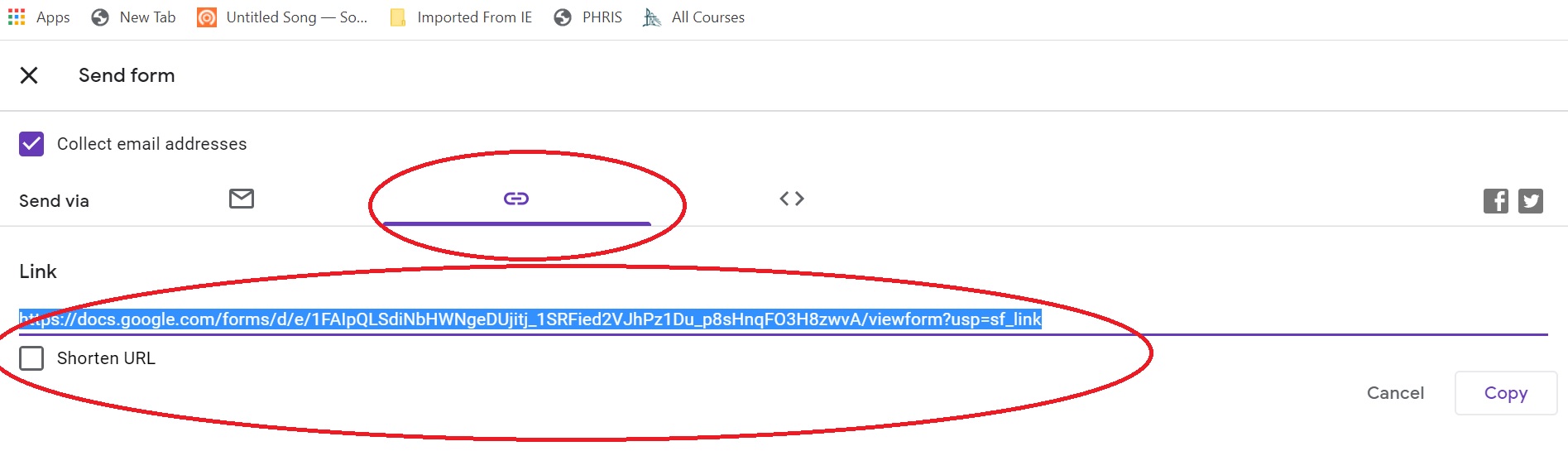
You can create an assignment and just add the link to the google form. You can then add instructions and a title, and you are done.

You can get the link to the google form by going to your copy of the form on google drive. Click on the send button and then select the link tab. This will provide you with the link you need.

The Canvas platform

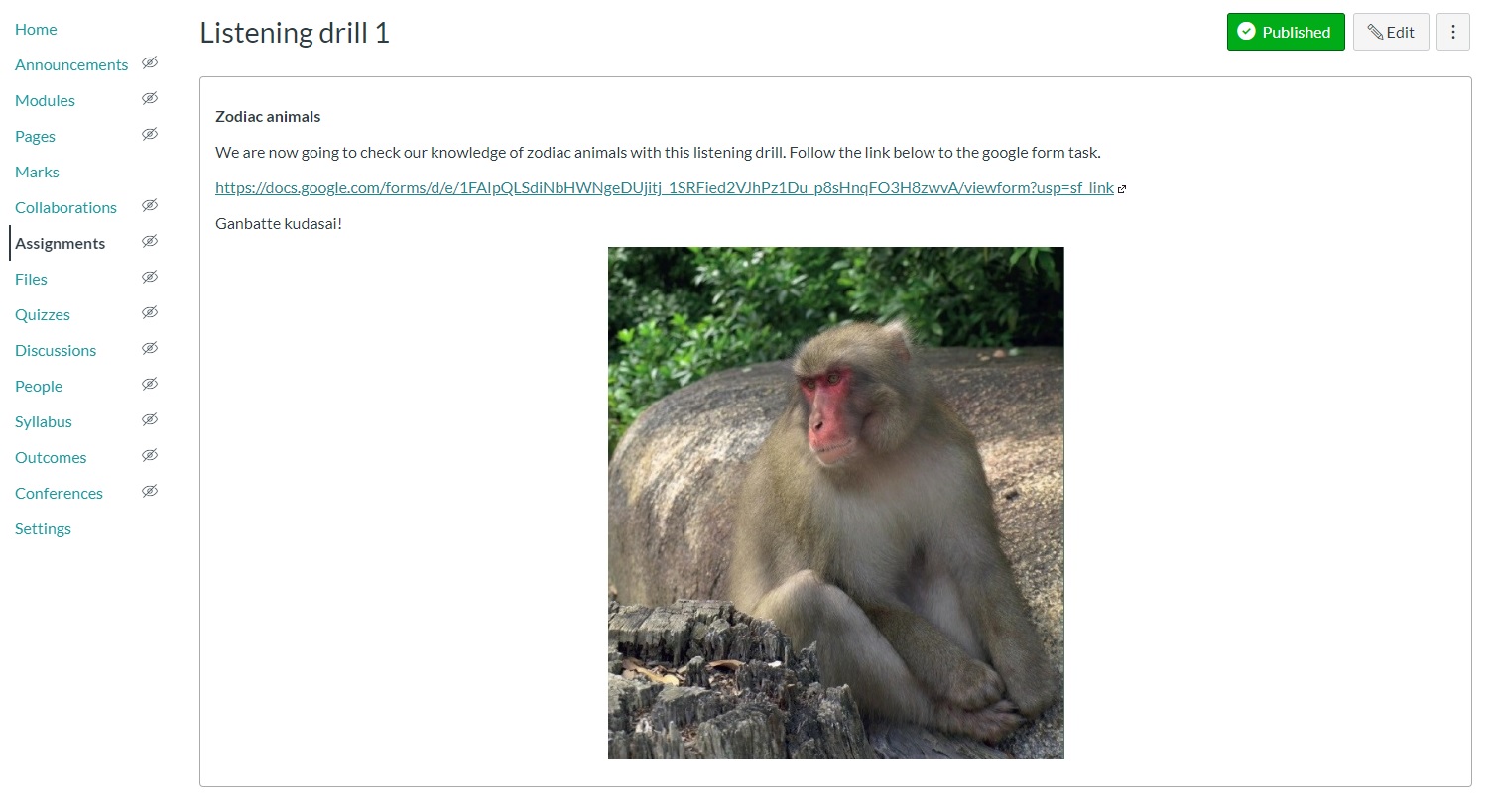
You can achieve the same thing in Canvas by adding the link to the google form and directing students out of Canvas to complete the form. (See above regarding how to get the link to your google form.) I added this to my module as an assignment page. If you want to keep the marks all in Canvas, you can manually add the score to Canvas if you add the points to the Canvas assignment set up.

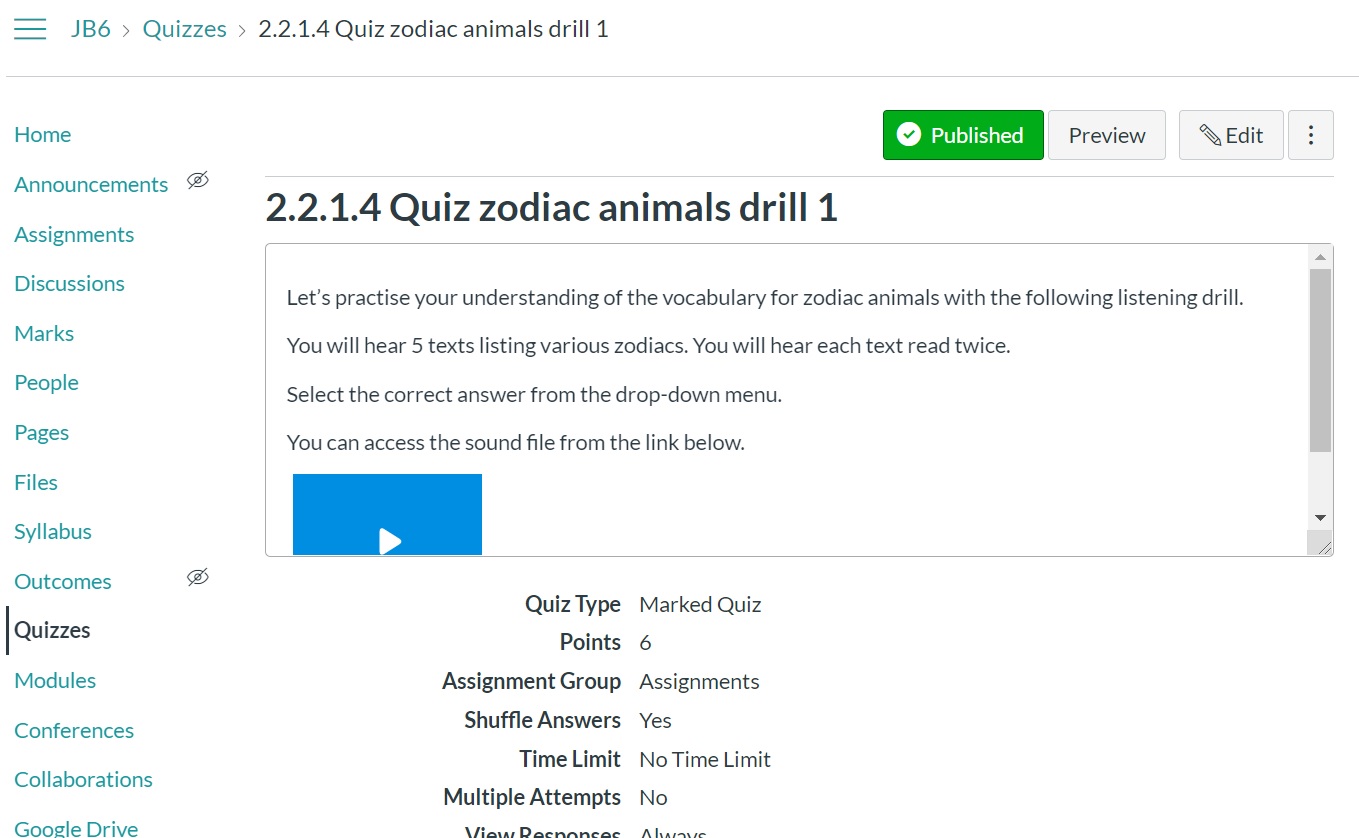
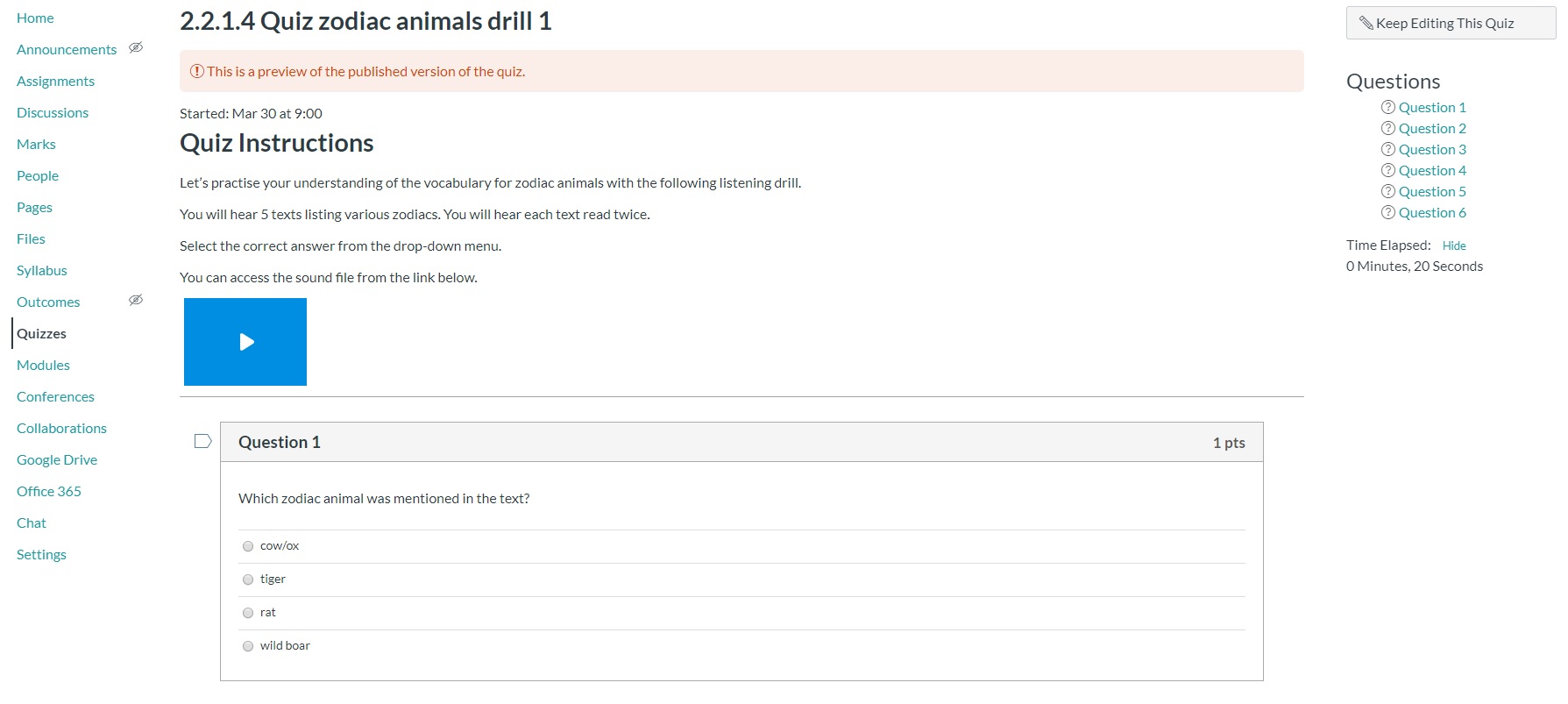
When you have more time, you may want to start moving the content into Canvas as a Canvas quiz and keep everything within the one program. You can do this by setting up a normal Canvas quiz page and adding the sound file for the quiz from your Jblog google folder.

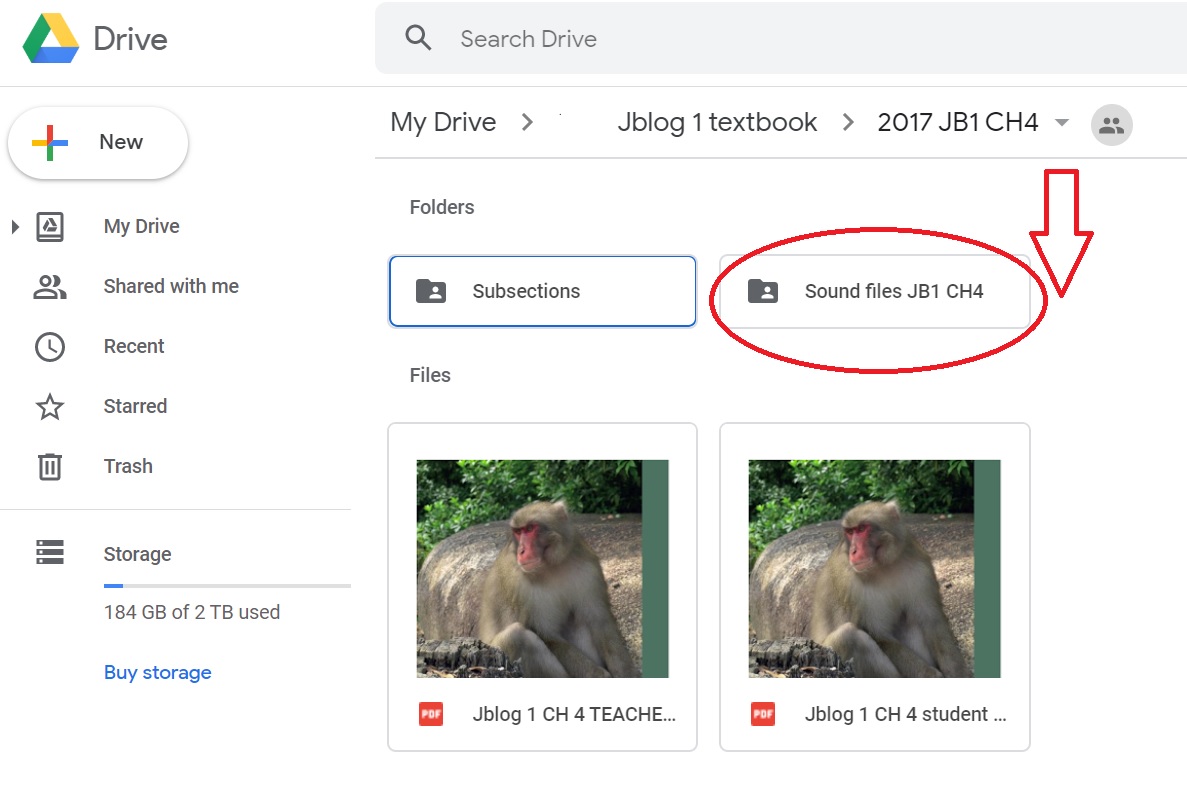
You can find the sound files in your google folder in the Sound files folder for the relevant chapter. Upload that sound file to Canvas by selecting the record/upload media button, then select the Upload media tab and Select audio file tab. I find this works better than inserting a link to a file as that tends to require a download and is less seamless.

You can then copy and paste the questions and answers into your new Canvas quiz from your old google quiz.

Good luck everybody. If you have questions or you get stuck, please feel free to contact me at  jblog1help@gmail.com .
We are all learning together and if I can help if some way, please let me.

Stay well.

Filed Under: Growth mindset, ICT, Teacher Wellbeing, Teaching and Learning, Uncategorized

New ways with old resources

March 23, 2020 by Manten Resources

Tomorrow my son’s school will close and we will be a family of 3 working from home. As many of us face similar prospects, it is a good time to reimagine some of our old resources in the new online context.

I am a tactile teacher and love hard copies, particularly for tasks where I want the students to write. I am a parent too though and realise that even if I upload worksheets online, the expense of printing at home will not be feasible in the long run for most families. This has led me to look at options for how to use my old favourite worksheets without printing them out. If you are using Jblog student workbooks, you will realise that most of the tasks are also available as pre-made google forms. You can simply upload these to your school platform such as google classroom. Some tasks do not fit that format though so let’s look at how we might tackle these activities.

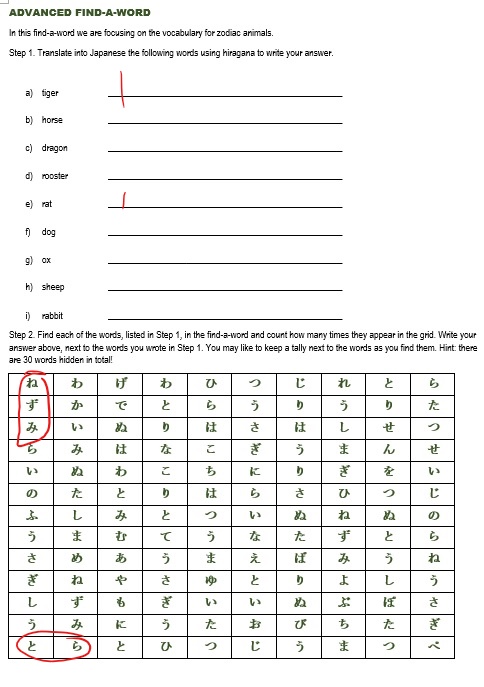
We are going to use this example of a find-a-word that the teacher has made as a word document.

Option 1. Make the worksheet a jpeg image.

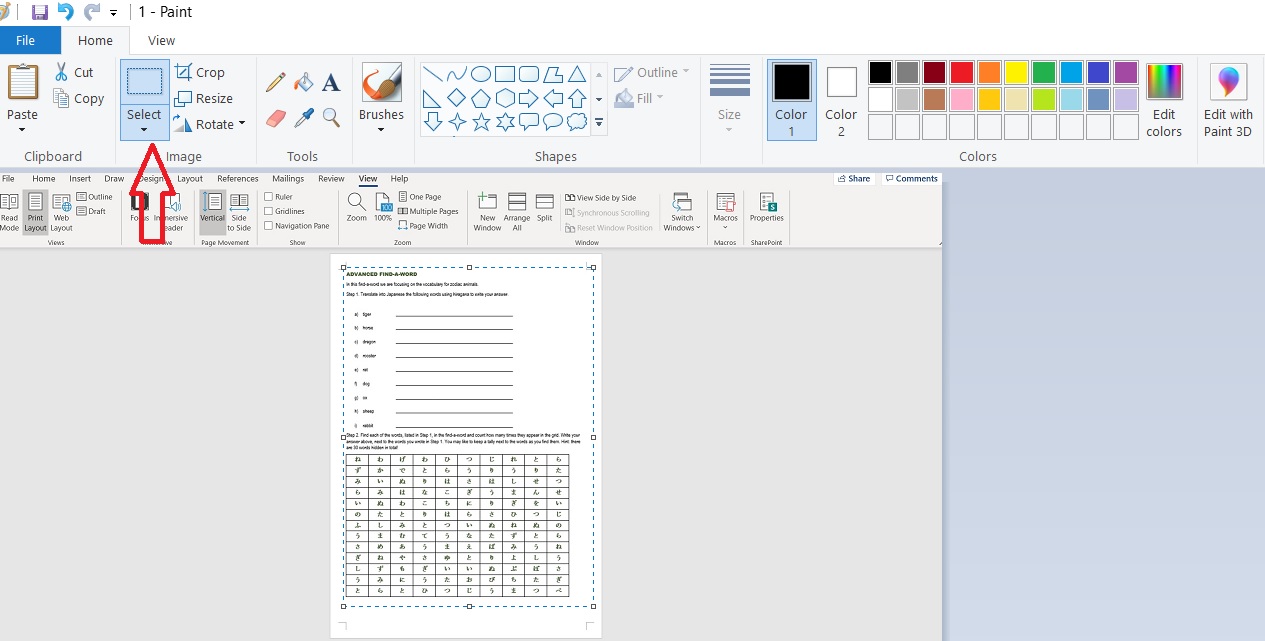
  1. Open the word document and CTRL+prt sc to screenshot the worksheet.
  2. Paste into paint program. Zoom out so that you can see the full page. Click on the Home tab + select.
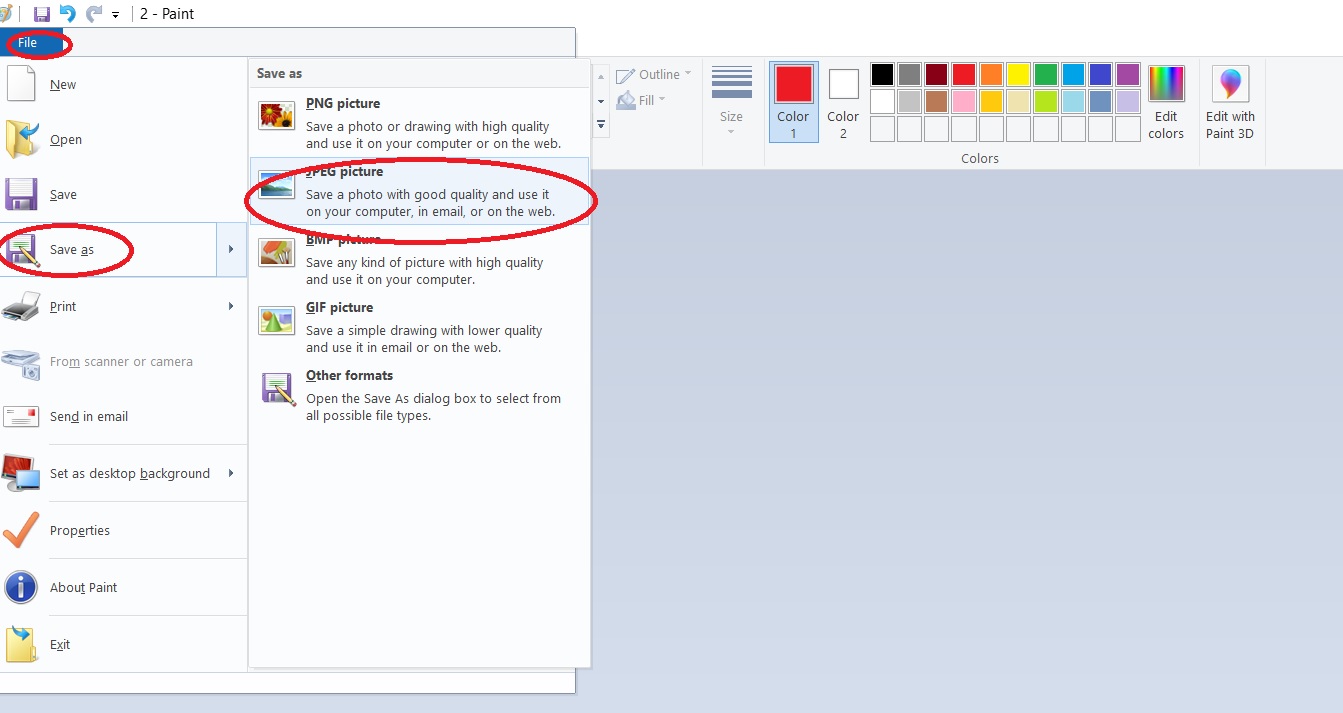
  3. You will be left with just the image of your worksheet. Click on file + save as + jpeg and name the image.
  4. You can now upload the jpeg to your online platform. The students can then open up their copy and complete it using their digital pen. They can save the completed image and share with you as evidence of their work.

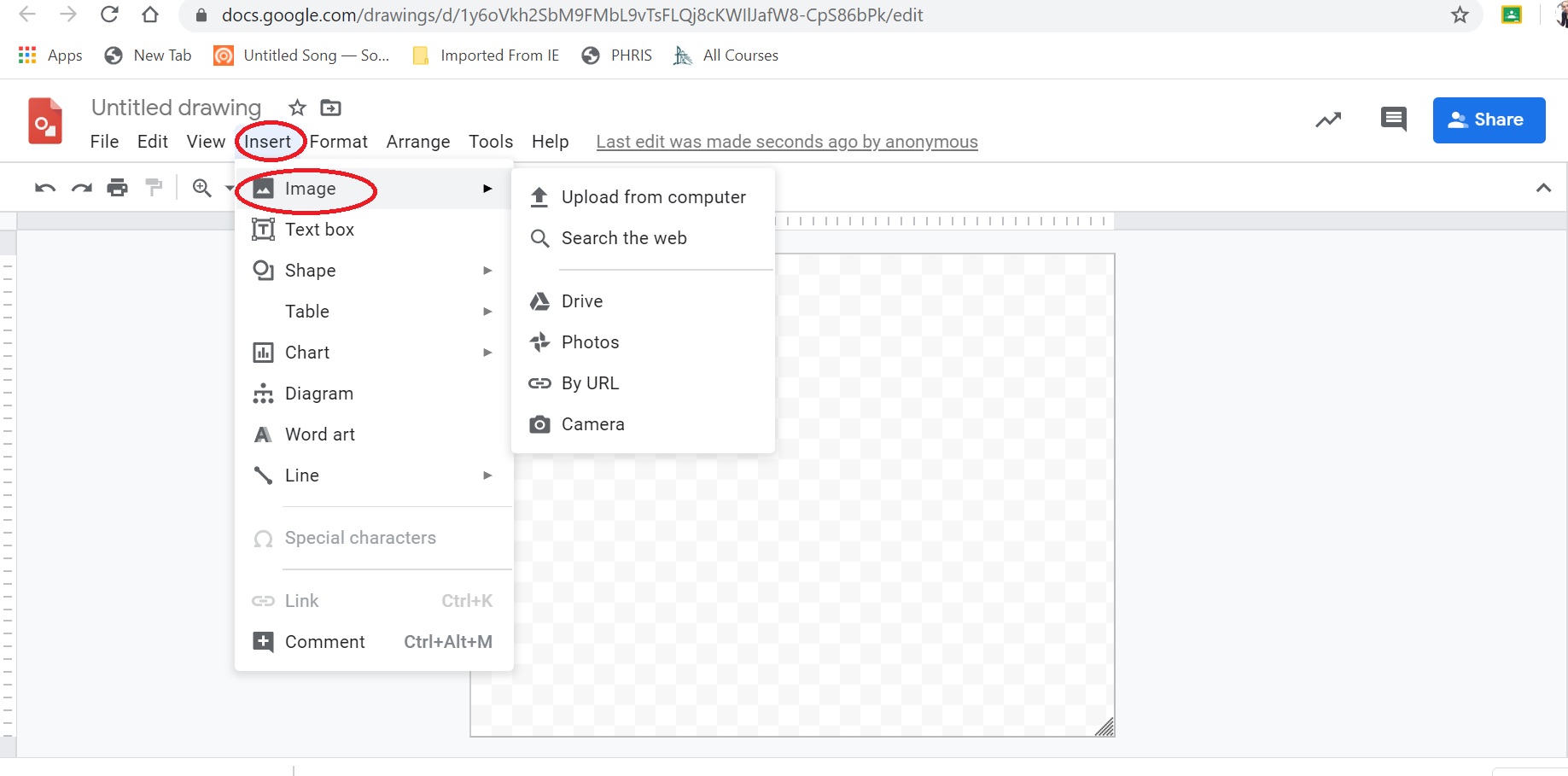
Option 2. Make the worksheet a google drawing

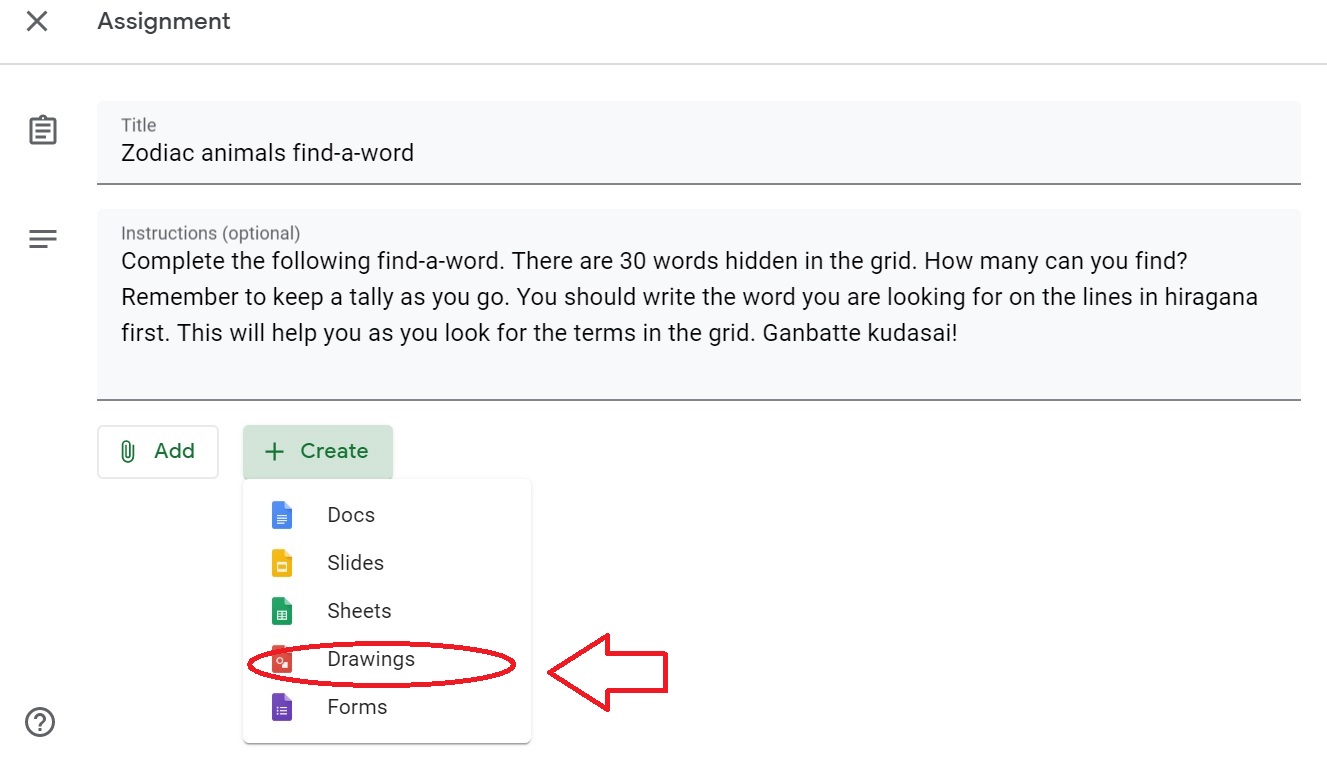
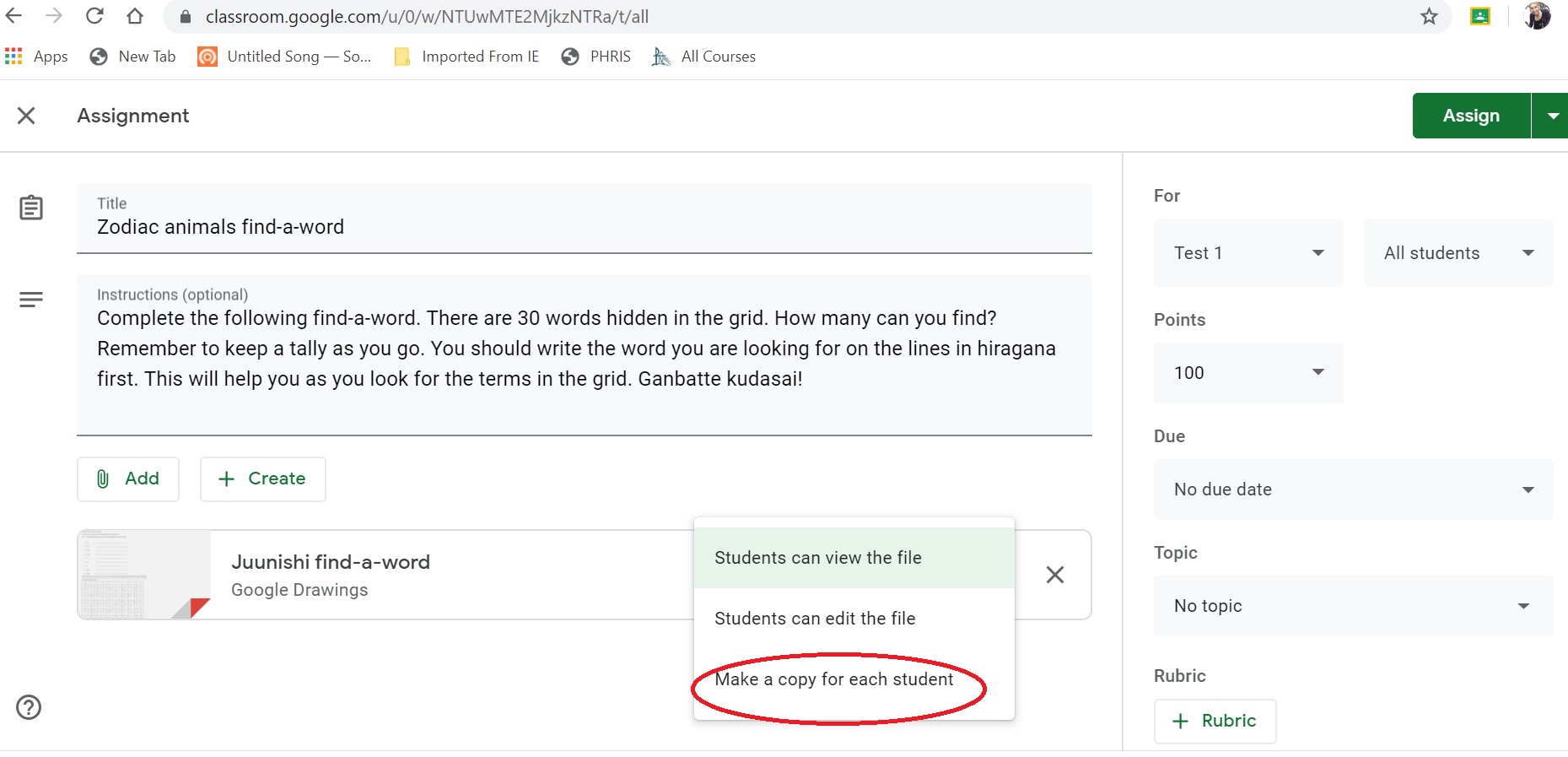
  1. In your google classroom, make a new assignment. Type in the instructions for the task.
  2. Click on the create button to access the drop-down menu. Select google drawings.
  3. Paste your jpeg image into the google drawing page. Select make a copy for each student.
  4. Click on assign (if you are ready for them to see the task). Students can then answer on their copy which is saved automatically.


This example was for a simple worksheet but you could use it with longer tasks such as teaching hiragana via the Hiragana Patch system.

There are lots of great interactive tasks online for us to use but don’t forget to include some calming tasks such as this find-a-word in your programming of activities.

Remember my favourite quote “The worst use of time is to do something really well that needn’t be done at all”. (Brian Tracy, Eat that frog!) If you have a worksheet that works, keep on using it. You just need to update how your student accesses it.

Good luck everyone.

Filed Under: ICT, Teacher Wellbeing, Teaching and Learning, Uncategorized

Ideas for incorporating Sustainability in your program

March 7, 2018 by Manten Resources

Sustainability is one of the key cross-curriculum priorities of the Australian Curriculum. The environment is an obvious context for this content. Some teachers may be concerned that this topic  is too challenging for their students but it doesn’t have to be. Here are some ideas modelling how to differentiate an environmental unit.

This task is based on the content in chapter 7 of Jblog textbook 3. This unit introduces students to key environmental issues in Japan such as cleaning up Mt Fuji, the Fukushima nuclear power plant disaster and solar panel farm controversy. Students are then directed to consider their own impact on the environment. The following task from the student workbook could be used as the driving question for the unit.

Learning task : In pairs or small groups, choose an environmental issue in your community. What action could you take to help with this issue? Design promotional materials using Japanese (eg poster, flier, videoclip) to promote positive action for your cause.

Extension task: Research how other Japanese communities are grappling with your issue (or similar) in the Japanese context. (Students with prior learning and/or experience, background or who are working at a GT level should be encouraged to use realia in Japanese as part of this research.)

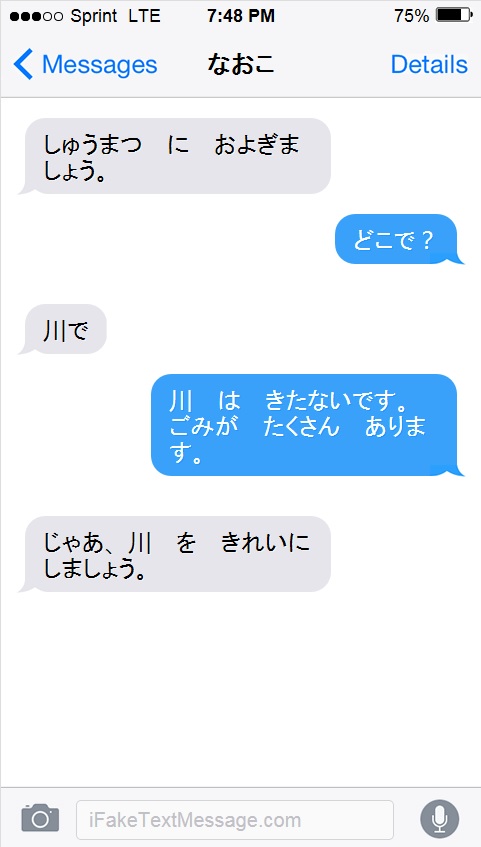
For students who are working at a lower level or who find composing in Japanese intimidating, using a Fake text app may make this more palatable. For example students could use the stimulus on page 86 of the textbook that advertises a river clean-up day. They could then write a series of text messages between two friends planning to attend the event.

 (Click on image to view as a larger image)

There are various applications out that can help you create fake text messages. I found this one was the easiest to use for me personally:  https://ifaketextmessage.com.

There are several more examples of how to create and use fake text messages in our March newsletter. If you missed it, please email me and I can send you through a back issue. You can sign up for our newsletter on the website homepage – just scroll to the bottom of the screen for the sign-up form.

Further reading:

You may also be interested in our post about the Australian Curriculum

Filed Under: Australian Curriculum, Differentiation, ICT

Primary Sidebar

Copyright © 2026 · Manten Resources - All Rights Reserved