• Skip to primary navigation
  • Skip to main content
  • Skip to primary sidebar

Manten Resources

Supporting your Japanese language program

  • Manten Resources
  • About
  • Teachers
    • Stage 6 Beginners
    • Jblog Textbooks
      • Jblog 1
      • Jblog 2
      • Jblog 3
      • Programming
    • Base Camp
    • Student Workbooks
    • Amazing Races
    • Assessment
      • Manten Exams
      • Assessment Inspiration
      • Script Resources
    • Blog Spot
  • Parents
  • Contact

Uncategorized

Online learning options

March 30, 2020 by Manten Resources

During this new period of self-isolation and restricted movement, I have discovered a new level of mindfulness in my daily life. Even road signs begin to take on new meaning when so many of our daily distractions, both good and bad, have been removed. This week’s roadside prophecy was “Use other path”. This is the reality for many teachers now coming to terms with online learning.

Today I want to focus on what a lesson might look like in two common platforms – Canvas and Google classroom. The key point to remember is that you do not need to be perfect. Have a growth mindset and allow yourself the space to improve gradually. In this post I will show you how to use your Jblog google forms as they are in a google platform and how to adapt them to the Canvas platform. If you click on the images contained in this post you will be able to see them more clearly.

The Google platform

If you are using Google classroom it is relatively straightforward to add your google form task to your classwork stream.

You can create an assignment and just add the link to the google form. You can then add instructions and a title, and you are done.

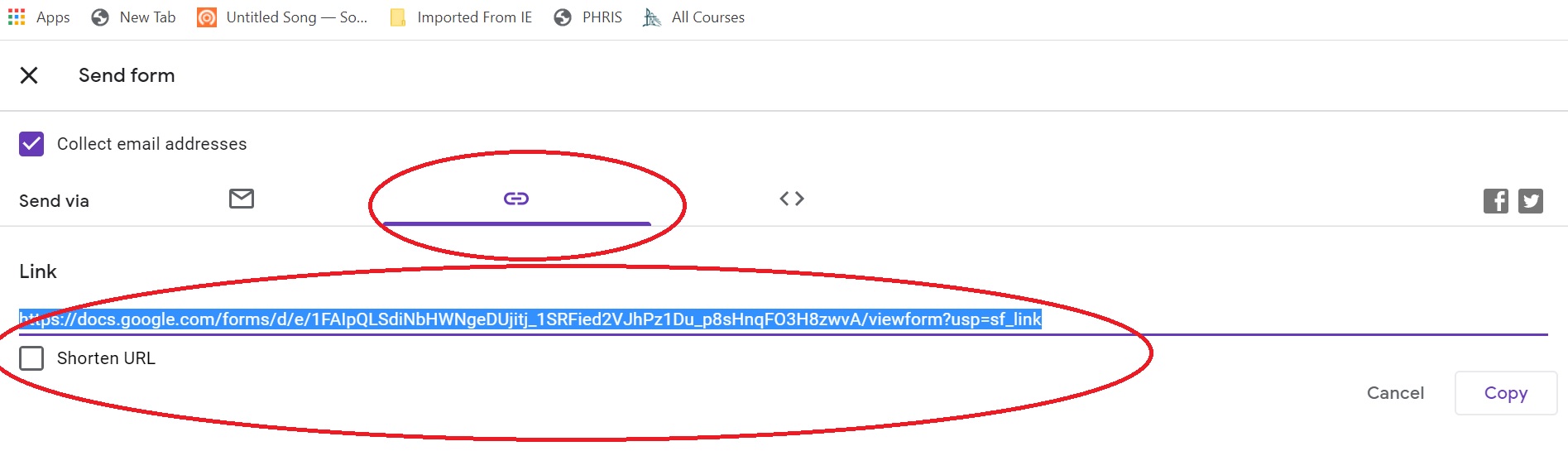
You can get the link to the google form by going to your copy of the form on google drive. Click on the send button and then select the link tab. This will provide you with the link you need.
The Canvas platform

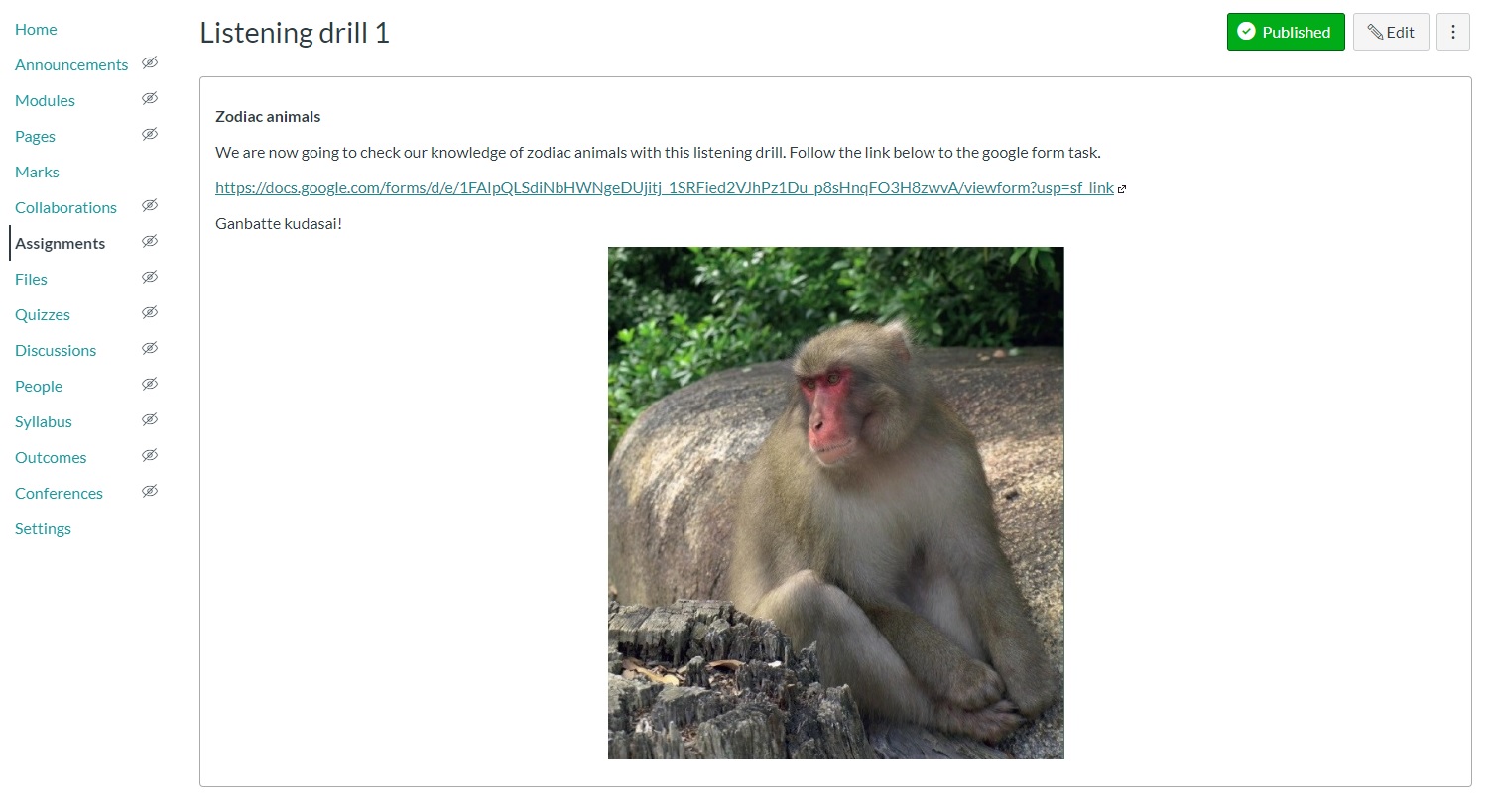
You can achieve the same thing in Canvas by adding the link to the google form and directing students out of Canvas to complete the form. (See above regarding how to get the link to your google form.) I added this to my module as an assignment page. If you want to keep the marks all in Canvas, you can manually add the score to Canvas if you add the points to the Canvas assignment set up.
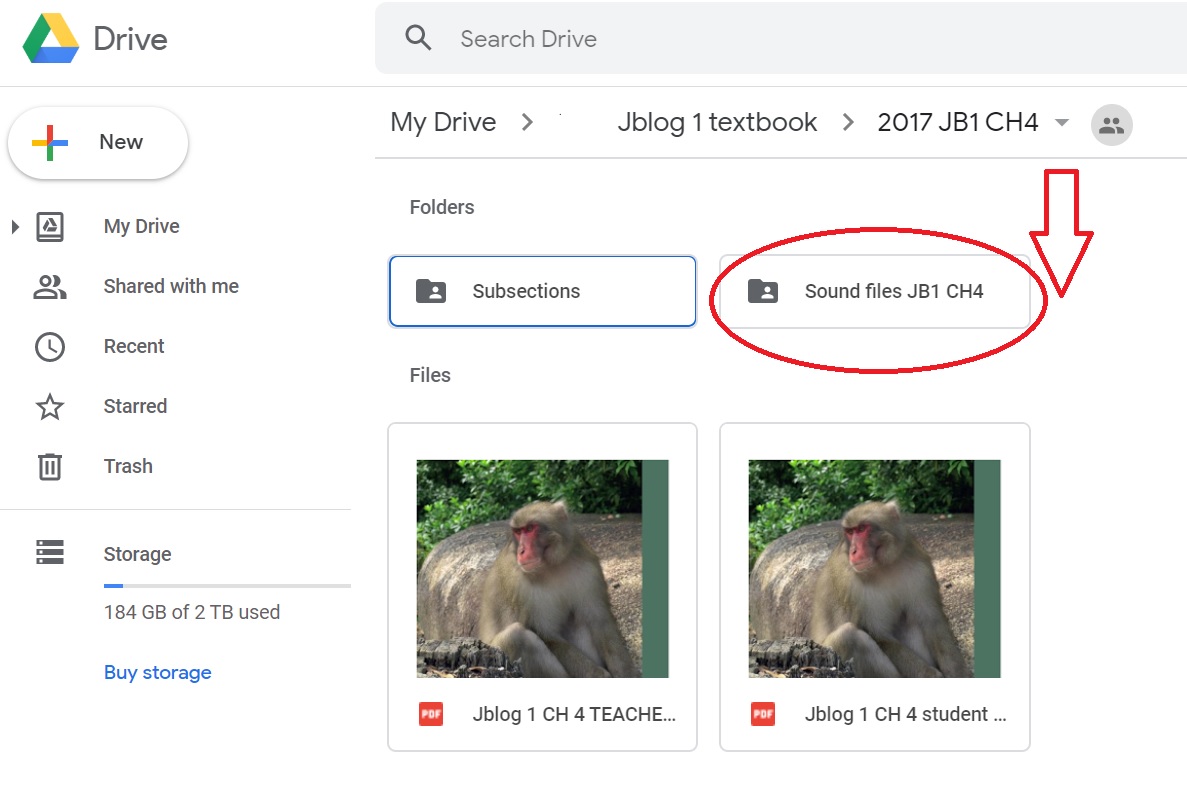
When you have more time, you may want to start moving the content into Canvas as a Canvas quiz and keep everything within the one program. You can do this by setting up a normal Canvas quiz page and adding the sound file for the quiz from your Jblog google folder.
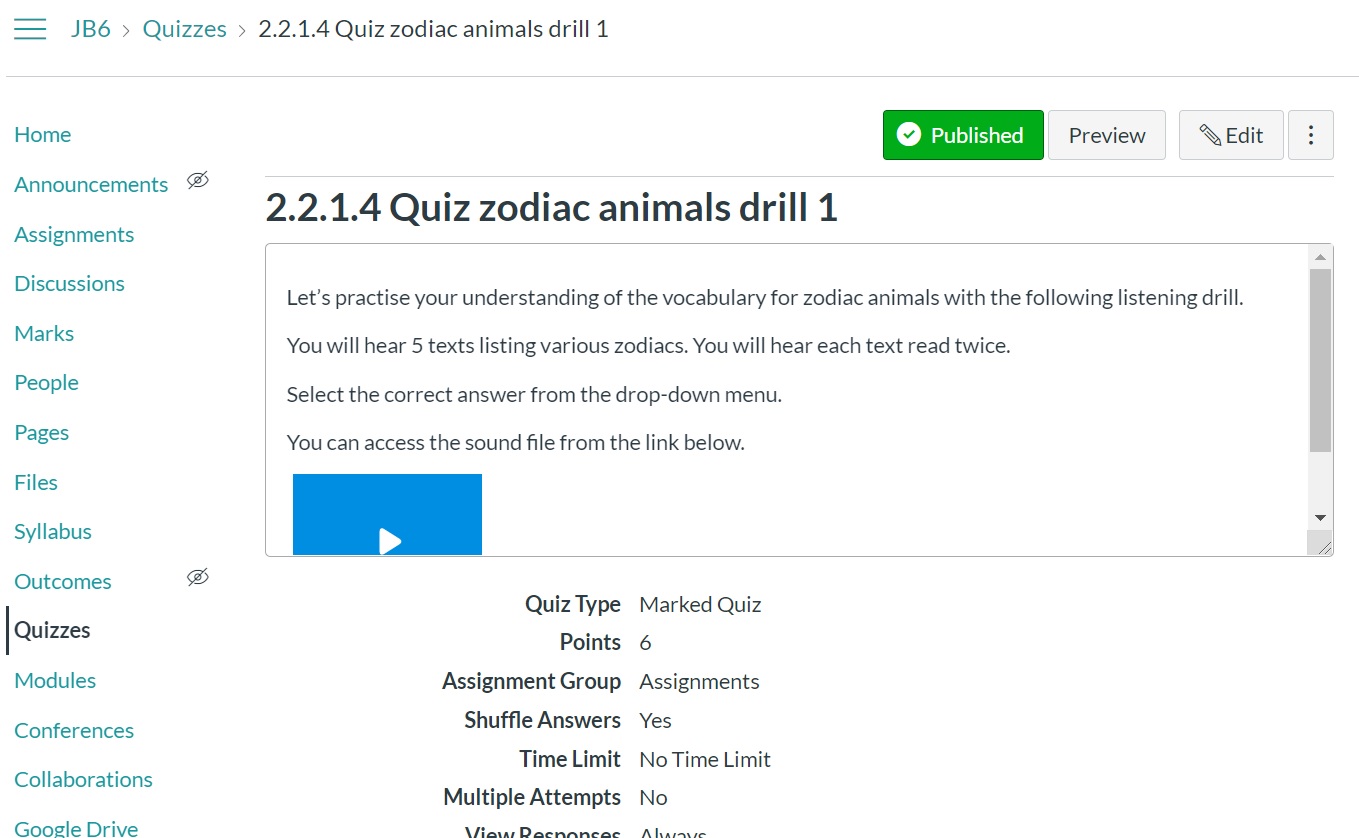
You can find the sound files in your google folder in the Sound files folder for the relevant chapter. Upload that sound file to Canvas by selecting the record/upload media button, then select the Upload media tab and Select audio file tab. I find this works better than inserting a link to a file as that tends to require a download and is less seamless.
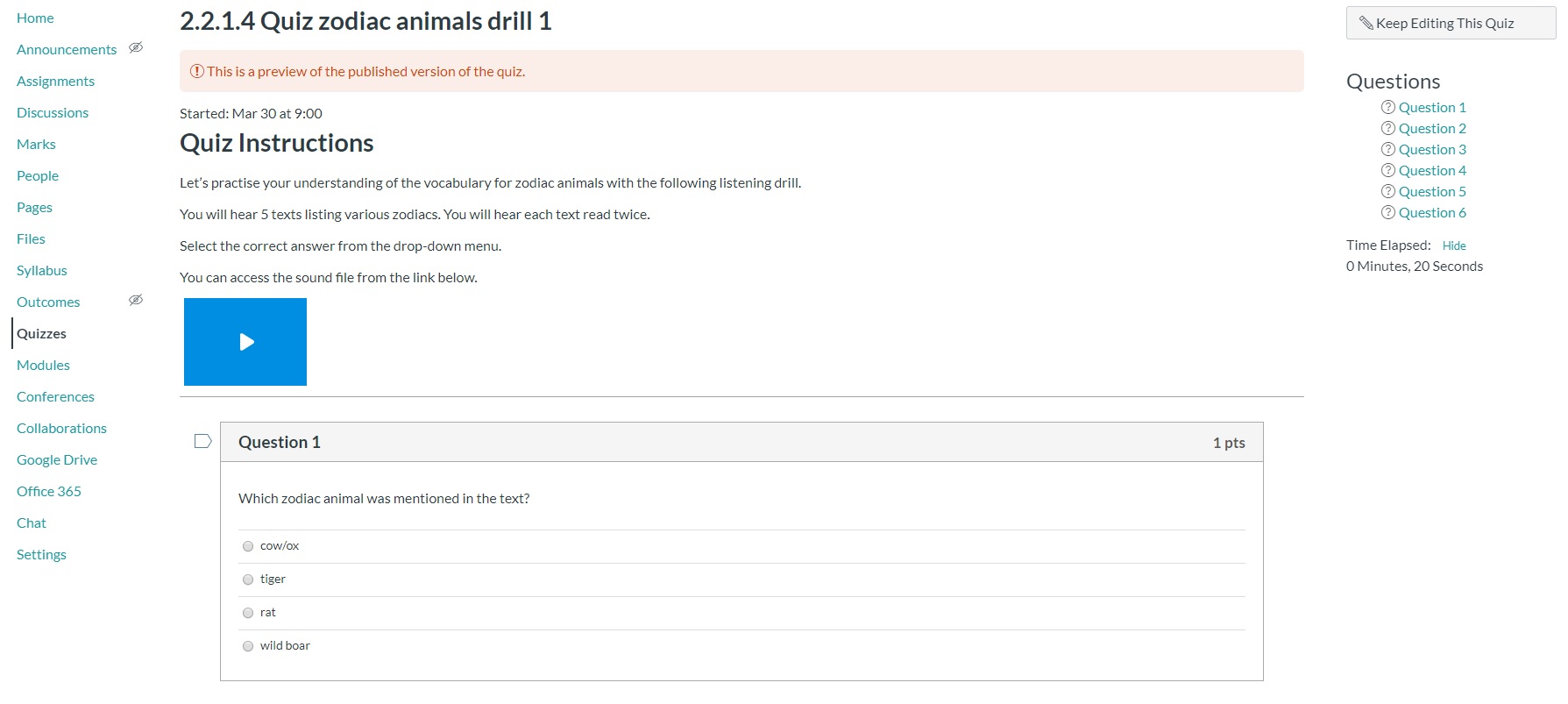
You can then copy and paste the questions and answers into your new Canvas quiz from your old google quiz.
Good luck everybody. If you have questions or you get stuck, please feel free to contact me at  jblog1help@gmail.com .

We are all learning together and if I can help if some way, please let me.

Stay well.
Filed Under: Growth mindset, ICT, Teacher Wellbeing, Teaching and Learning, Uncategorized

New ways with old resources

March 23, 2020 by Manten Resources

Tomorrow my son’s school will close and we will be a family of 3 working from home. As many of us face similar prospects, it is a good time to reimagine some of our old resources in the new online context.

I am a tactile teacher and love hard copies, particularly for tasks where I want the students to write. I am a parent too though and realise that even if I upload worksheets online, the expense of printing at home will not be feasible in the long run for most families. This has led me to look at options for how to use my old favourite worksheets without printing them out. If you are using Jblog student workbooks, you will realise that most of the tasks are also available as pre-made google forms. You can simply upload these to your school platform such as google classroom. Some tasks do not fit that format though so let’s look at how we might tackle these activities.

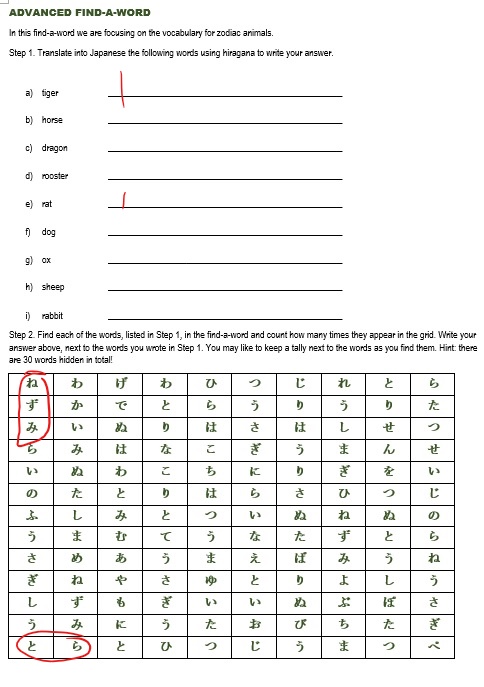
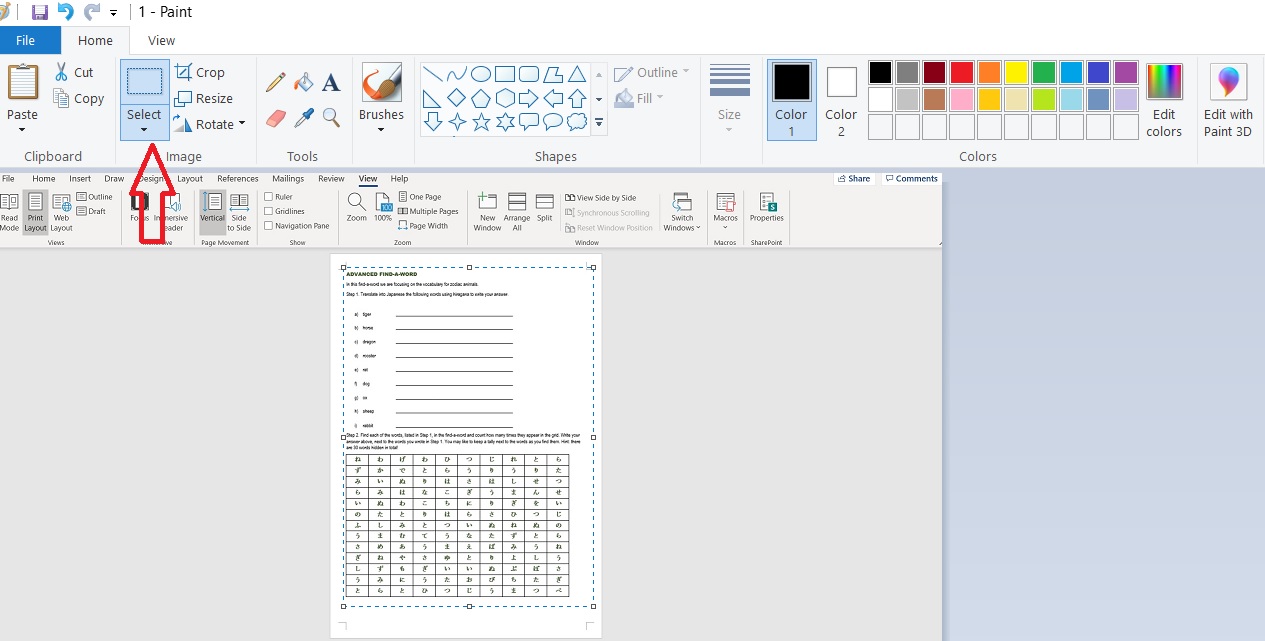
We are going to use this example of a find-a-word that the teacher has made as a word document.

Option 1. Make the worksheet a jpeg image.

  1. Open the word document and CTRL+prt sc to screenshot the worksheet.
  2. Paste into paint program. Zoom out so that you can see the full page. Click on the Home tab + select.
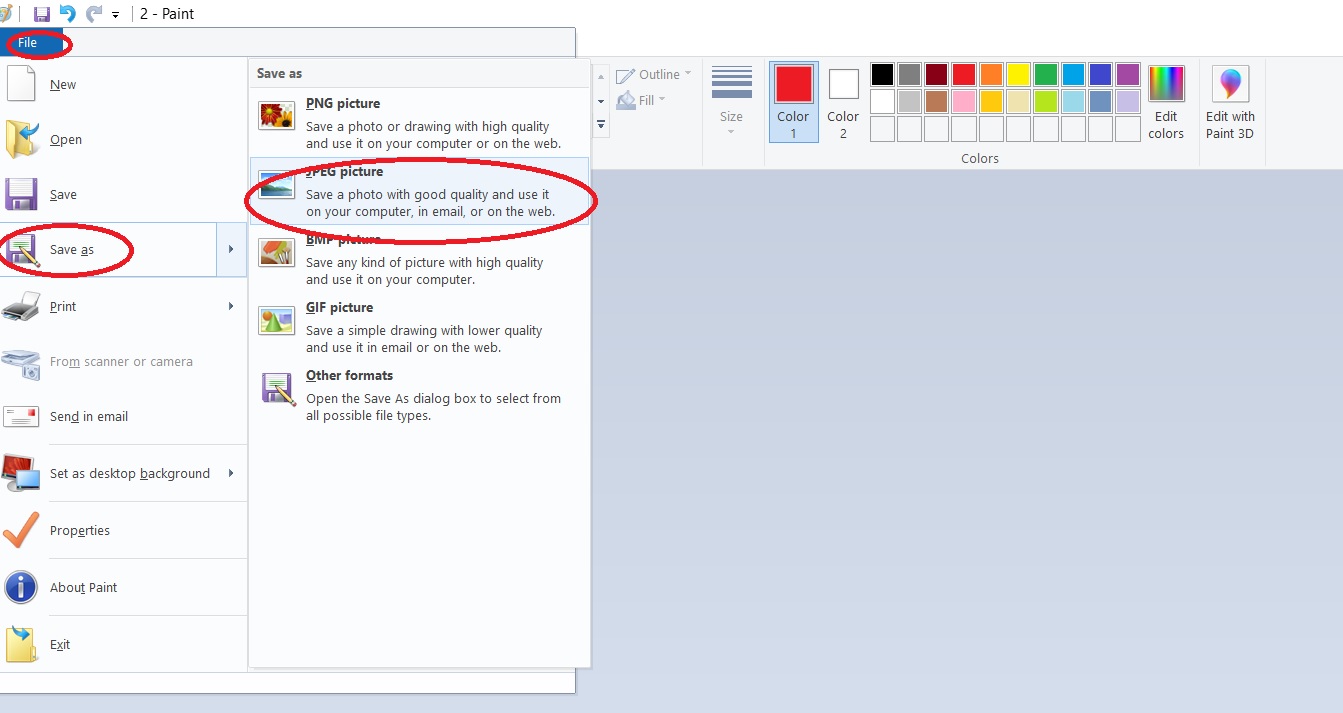
  3. You will be left with just the image of your worksheet. Click on file + save as + jpeg and name the image.
  4. You can now upload the jpeg to your online platform. The students can then open up their copy and complete it using their digital pen. They can save the completed image and share with you as evidence of their work.

Option 2. Make the worksheet a google drawing

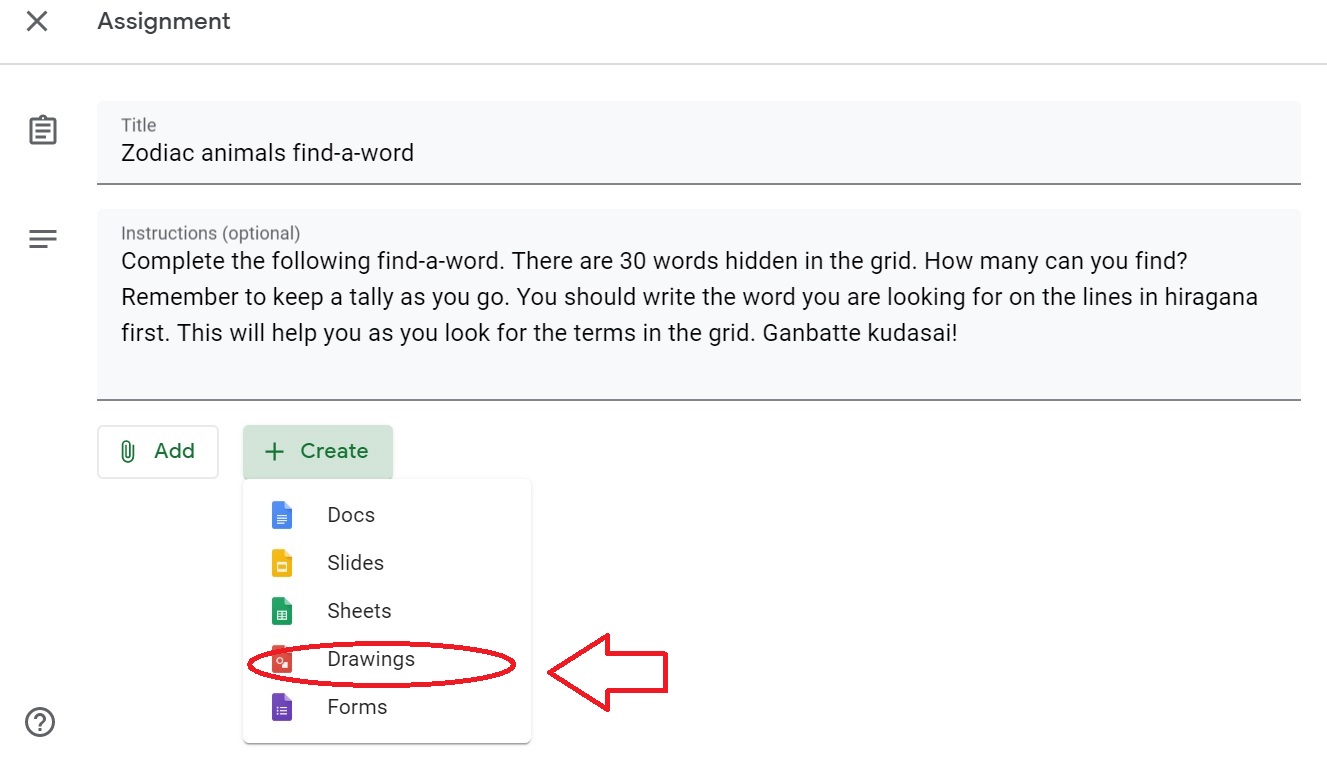
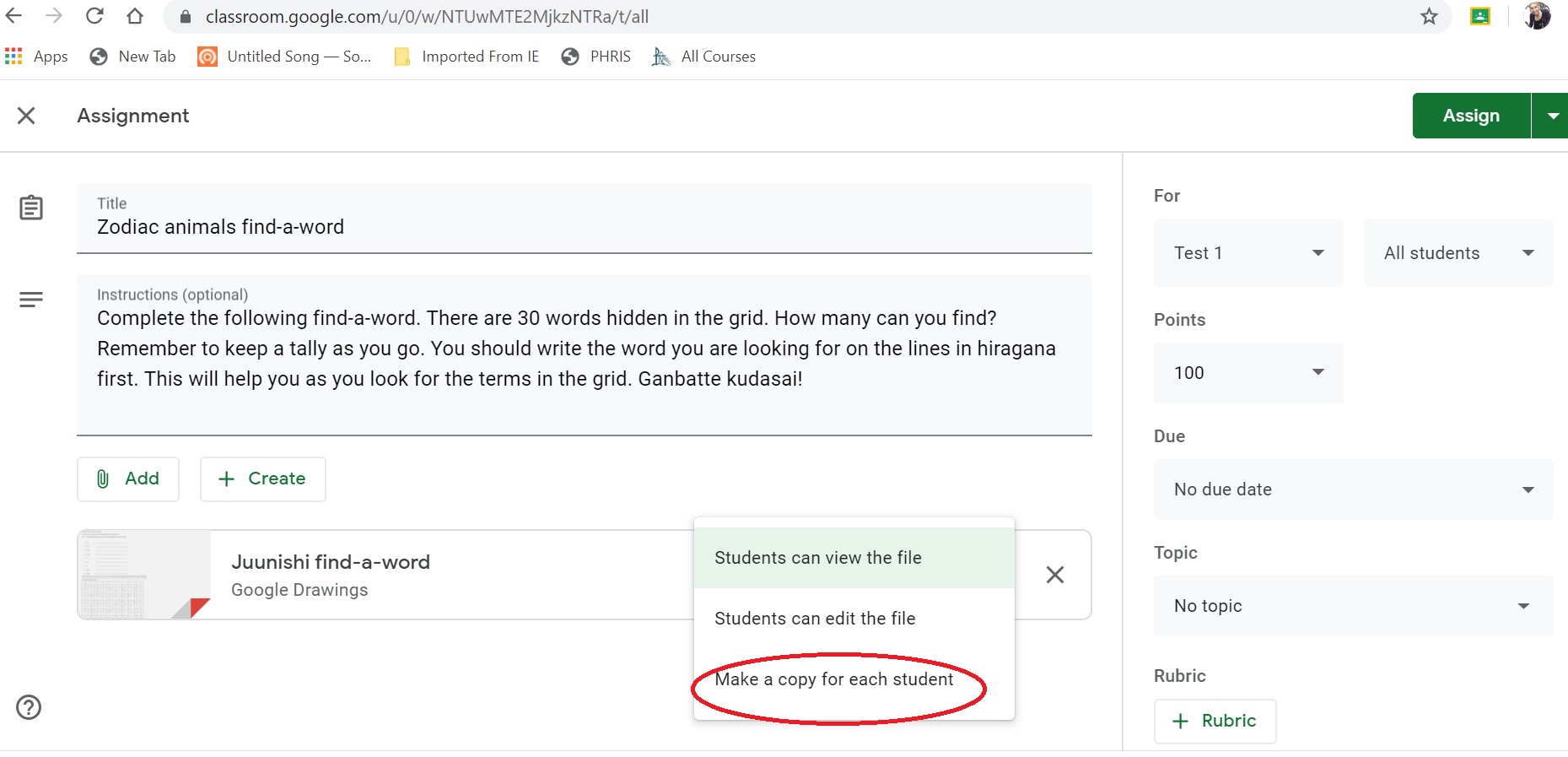
  1. In your google classroom, make a new assignment. Type in the instructions for the task.
  2. Click on the create button to access the drop-down menu. Select google drawings.
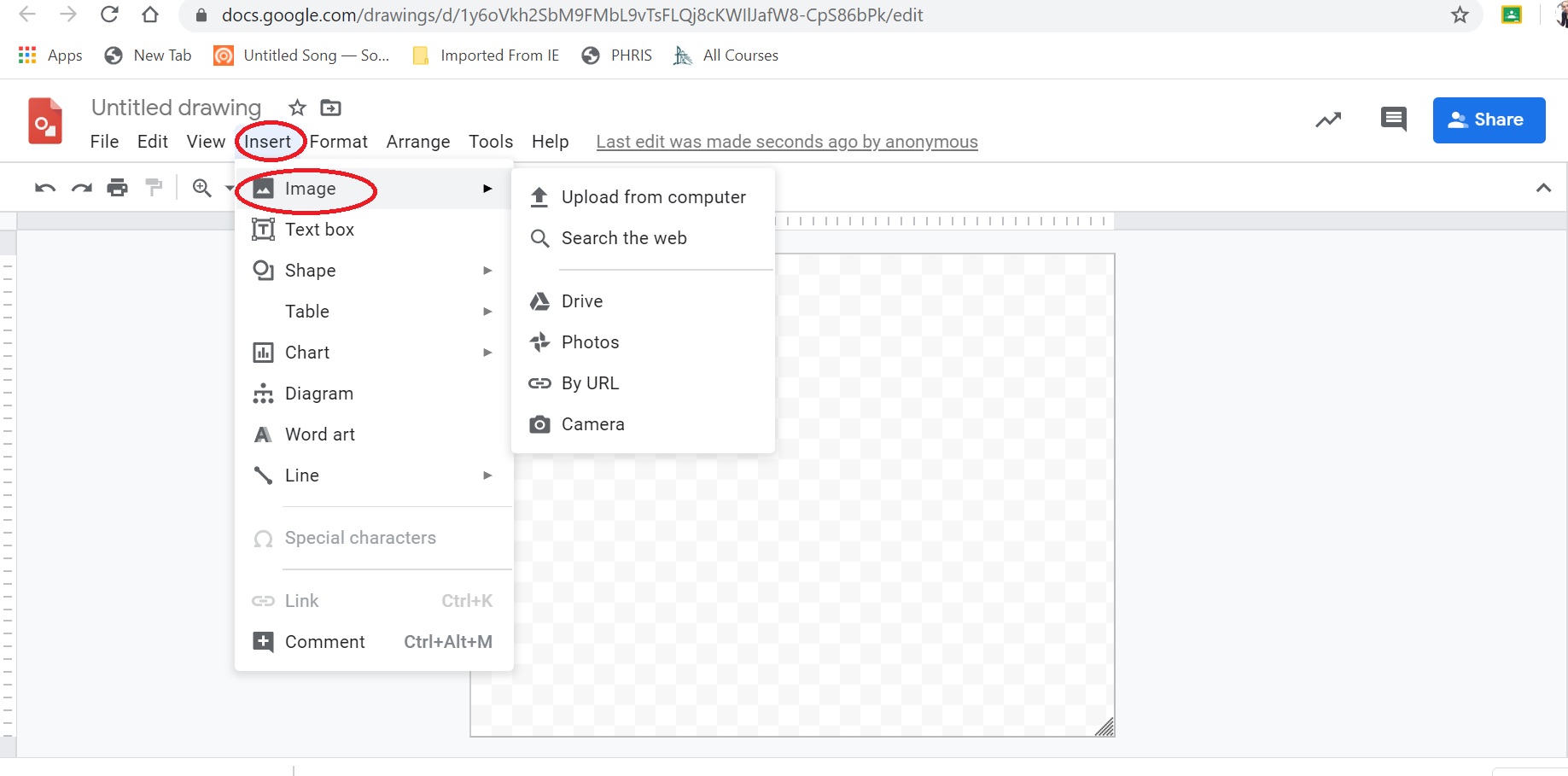
  3. Paste your jpeg image into the google drawing page. Select make a copy for each student.
  4. Click on assign (if you are ready for them to see the task). Students can then answer on their copy which is saved automatically.


This example was for a simple worksheet but you could use it with longer tasks such as teaching hiragana via the Hiragana Patch system.

There are lots of great interactive tasks online for us to use but don’t forget to include some calming tasks such as this find-a-word in your programming of activities.

Remember my favourite quote “The worst use of time is to do something really well that needn’t be done at all”. (Brian Tracy, Eat that frog!) If you have a worksheet that works, keep on using it. You just need to update how your student accesses it.

Good luck everyone.

Filed Under: ICT, Teacher Wellbeing, Teaching and Learning, Uncategorized

How’s your Losada ratio?

January 19, 2018 by Manten Resources

The summer holidays are a fabulous time to reconnect with interests that you may not find time for during school term. These interests are what bring breadth and depth to your lessons so it is important that you nurture them and yourselves over the break.

This summer I have been inspired by Applied Positive Psychology and in particular the work of Martin Seligman. The success of our instruction is influenced so much by the psychological state of our students. As we know, building rapport with individuals and developing a positive classroom atmosphere will influence student learning outcomes – and the teacher’s stress levels at the end of the day!

One concept that may help us with this is the Losada ratio. This study found that there is a “sweet spot” for the ideal ratio of positive to negative comments in our daily interactions. Roughly 3 positive to 1 negative statement was found to result in flourishing companies – both economically and socially. There is a need for honest negative feedback though and being too positive (13 positive statements to 1 negative) was found to result in a lack of credibility and not enough direction for success and growth to occur.

It is easy for us to fall into the trap of only correcting behaviour rather than acknowledge what is going well. When I refer to behaviour here though, I am also including student language skill development. When teachers provide spoken or written feedback to students they tend to provide predominately feedback about how to improve. Whilst this can be useful, it is important we aim higher at reaching the Losada ratio sweet spot. If we fail to acknowledge that a student has used correct stroke order and a great connective between two statements then they may not realise that what they are doing is impressive and they will be less likely to repeat the good habits next time. Students are not always aware of their strengths so it is important that we look for evidence of their progress and report it back to them as a positive comment. Using growth mindset language can greatly help with this as well. Take a look at the two examples below of teacher feedback regarding a student error.

Feedback 1:

You have written the dash in シドニー the wrong way. You should write the dash horizontally when writing a text horizontally. (Note the underlines are for emphasis here and would not be included when given to the student. This is explanation feedback but the terms “wrong” and “should” do not reflect growth mindset terminology.)

Feedback 2:

I was really impressed to see you stretch yourself to include the new kanji from chapter 2 of Jblog 2. Take a look at the kanji index on page 125 of Jblog 2 and see if you can find the reason I have highlighted this kanji. See me though if you can’t see what I am referring to. (Growth mindset language used to highlight an error in kanji without labelling it as a mistake. A strategy to assist the students in making the correction themselves is provided instead. This has the potential to increase their feelings of self-efficacy.)

You can see from these examples that it is still possible to provide useful feedback to students about their mistakes using more positive language and thus bumping up your Losada ratio.

(There are more examples of how to do this in our Stage 5 Formative Assessment Writing Resource. Check out the link https://www.mantenresources.com.au/teachers/blog/new-growth-mindset-formative-assessment-resource/ if this is an area of interest for you.)

Good luck with those Losada ratios this term and remember that they work for both your interactions with students and your colleagues. Let’s spread some positivity in term 1!

Reference : Flourish by Martin E.P. Seligman (2013) published by Atria, New York.

Filed Under: Uncategorized

Primary Sidebar

Copyright © 2026 · Manten Resources - All Rights Reserved